Trip planning
How to use ChatGPT to plan a trip: prompts that work, and what to check
A seven-step method for planning a trip with ChatGPT, a prompt builder that puts your real flight and hotel times into the prompt, the follow-ups that fix weak plans, and what a real check of a ChatGPT plan found.
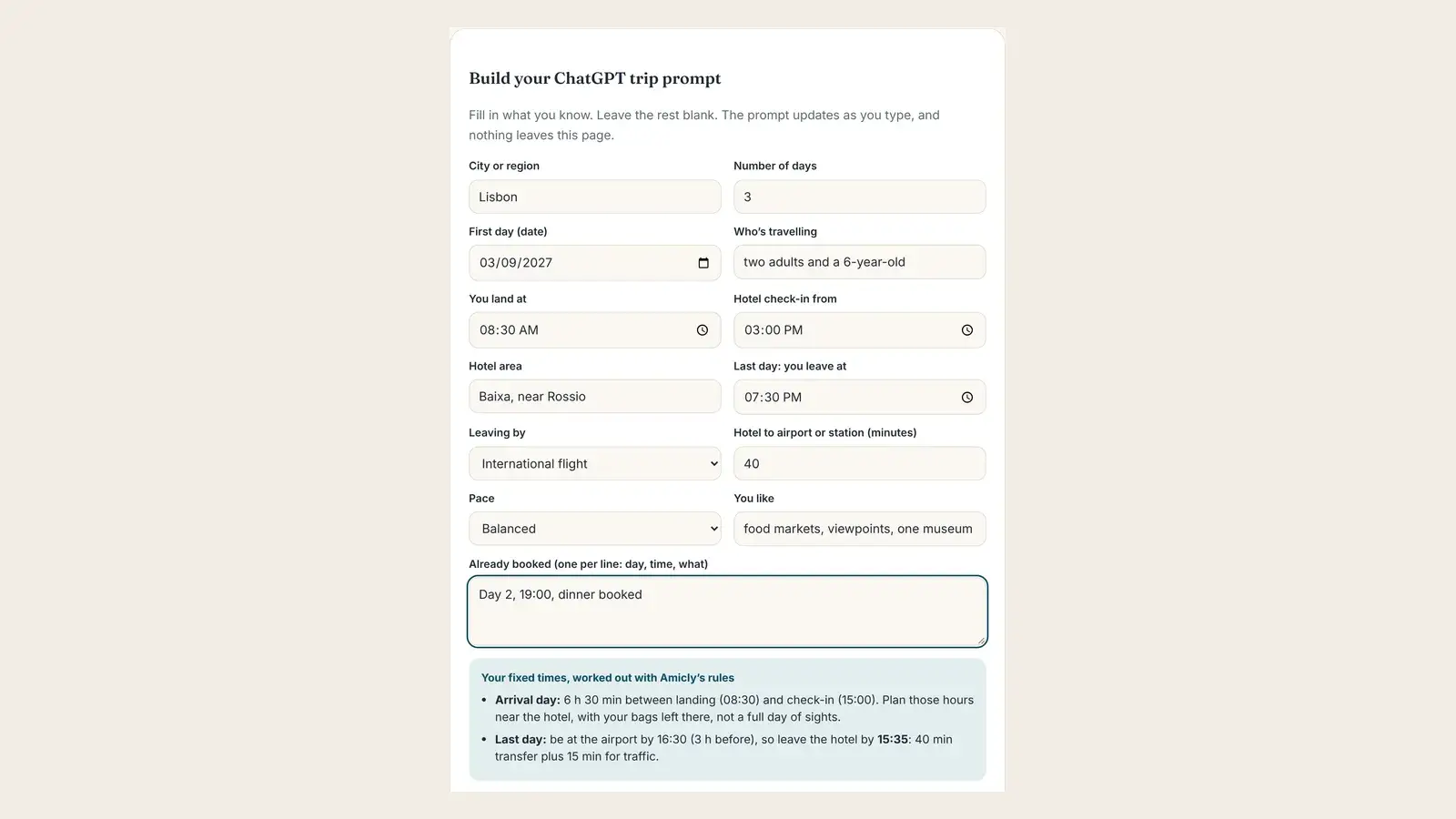
Short answer. To plan a trip with ChatGPT, give it your fixed facts first (dates, who’s travelling, landing time, hotel check-in, departure time and anything already booked), ask for one area per day at a set pace, and ask it to mark anything it isn’t sure of. Then treat the reply as a draft. Check every place, opening day and journey time on a map or the official site before you book.
ChatGPT is a good travel planning partner for the first hour. Ask it for three days in Lisbon and you’ll get neighbourhoods grouped sensibly, a pastry stop every morning and a tidy table, in about the time it takes to make a coffee.
What it can’t do is know what you didn’t tell it. It doesn’t know you land at 08:30 and can’t get into your room until 15:00, that your train leaves at 17:10, or that the dinner on day 2 is already booked. So it fills the gaps with a normal-looking day, and that’s where most plans go wrong. Below is a method that fixes that, a prompt builder that does the arithmetic for you, and the checks to run before you book.
Can ChatGPT plan a trip?
Yes, as a first draft. ChatGPT can suggest where to go, how long to stay, which areas to group together and what to do each day, and it rewrites the plan as often as you like. It can’t book anything by itself, and it doesn’t check its own facts against a map or a timetable.
That second point matters more than people expect. OpenAI’s own help centre says ChatGPT can give "incorrect or misleading information" that sounds convincing, and tells users not to rely on it as their only source. In the one study we know of that checked ChatGPT itineraries line by line (SEO Travel, 100 itineraries, May 2024), 90% had at least one error, and 52% put a visit outside opening hours. That study used an older model, but newer surveys point the same way: in Greetwell’s 2026 report, 16% of travellers who used AI had been recommended a place that didn’t exist.
So use ChatGPT for what it’s good at, and plan to check the rest. The rest of this guide is about doing both quickly.
What is ChatGPT good at, and where does it go wrong?
It’s strong at shape and ideas, and weak at anything that changes or has to be measured. This is the split we use:
| Task | How ChatGPT does | What to do |
|---|---|---|
| Choosing between destinations or areas | Good. It compares well and explains trade-offs | Use it freely |
| How many days to spend where | Good starting point | Sense-check against travel time between cities |
| Grouping sights by neighbourhood | Good | Check the walking times on a map |
| A day-by-day plan | Good structure, often too full | Set a pace in the prompt (see step 3) |
| Opening days and hours | Unreliable. It works from memory | Check the official site for your dates |
| Journey times between stops | Often optimistic or missing | Check each pair on a maps app |
| Your arrival and departure days | Usually treated as full days | Give it your real times (see step 2) |
| Restaurants and "hidden" places | Mixed; some are closed or invented | Look each one up on Google Maps |
| Prices, entry rules, visas | Not to be trusted | Only from the operator or the government |
| Packing lists, phrases, etiquette | Good | Use it freely |
If you remember one line from this table: let ChatGPT decide the shape, and let a map and the official sites decide the facts.
How do you use ChatGPT to plan a trip, step by step?
Seven steps, in this order. A three-day city trip takes about 30 minutes including the checks.
- Decide the shape first. Before asking for an itinerary, ask ChatGPT to help you choose: which city or cities, how many nights each, and which area to stay in. One conversation, a few questions, no day plans yet.
- Write down your fixed facts. Dates, who’s travelling, landing time, hotel check-in time, the time you leave on the last day, and anything already booked. These are the facts ChatGPT can’t guess.
- Choose a pace. Say how many stops a day you want and the most travel you’ll accept. Without this, plans fill up.
- Ask for the plan with your facts in it. Use the prompt builder below, or the prompt in the next section. Ask for exact place names, so you can look them up later.
- Push it with follow-ups. One change per message: a slower day, an indoor backup, a fix for a day that crosses the city.
- Check the plan before you book. Every place, every opening day, every journey. This is the step that saves a trip.
- Turn it into something you can use on the day. A saved plan on your phone that opens without a connection is better than a chat you have to scroll through.
The steps that most guides skip are 2 and 6. Both are below.
Build your prompt
Most weak ChatGPT itineraries come from a one-line prompt. This builder writes a full one with your real times in it, and works out two times you’d otherwise have to calculate: how long the gap is between landing and check-in, and when you need to leave the hotel on the last day. It uses the same rules as the Amicly app: be at the airport 3 hours before an international flight, 2 hours before a domestic one and 30 minutes before a train, and add at least 15 minutes, or a quarter of the journey if that’s more, for traffic. Your airline’s advice always comes first.
Build your ChatGPT trip prompt
Fill in what you know. Leave the rest blank. The prompt updates as you type, and nothing leaves this page.
Your fixed times, worked out with Amicly’s rules
- Add your landing, check-in and departure times to see them here.
When ChatGPT replies, paste its plan into Check my itinerary and Amicly looks up every place on Google Maps and times the journeys. Your first check is free.
The prompt asks ChatGPT for a pace limit of no more than 8 stops or 3 hours of travel a day. Those are the same limits Amicly’s checker flags, and they’re generous: most people enjoy a city more at 4 to 6 stops a day.
What should you tell ChatGPT before it plans?
Your fixed times and your limits, before your interests. A plan can only respect a 15:00 check-in or a 19:00 booking if it knows about them.
| Tell it | Why it matters | Example |
|---|---|---|
| Dates and weekdays | Museums and markets close on set weekdays | "Tuesday 10 to Thursday 12 March" |
| Who’s travelling | Changes the pace, meals and distances | "Two adults and a 6-year-old" |
| Landing time | Day 1 isn’t a full day | "We land at 08:30" |
| Hotel check-in and area | Where you can leave bags, and where days start | "Check-in 15:00, hotel near Rossio" |
| Departure time and type | Sets when the last day ends | "International flight at 19:30" |
| Anything booked | Must not be moved | "Day 2, 19:00, dinner booked" |
| Pace | Stops the day from overfilling | "4 to 6 stops a day, a rest after lunch" |
| What you like and don’t | Better suggestions | "Food and viewpoints, no shopping" |
What’s the best ChatGPT prompt for a travel itinerary?
One that includes your fixed facts, a pace, a format you can check and an instruction to admit doubt. If you’d rather not use the builder, copy this and fill in the brackets:
Plan [3] days in [city] from [weekday, date] to [weekday, date] for [who]. Our hotel is in [area]. On day 1 we land at [time] and can check in from [time], so day 1 is only the hours in between plus the evening. On the last day we leave at [time] by [plane or train] and must leave the hotel by [time]. These are booked and must stay at exactly these times: [list]. We like [interests]. Pace: [4 to 6] stops a day, never more than 8, and no more than 3 hours of travel in a day. Keep each day in one or two neighbouring areas. Include lunch and dinner as real stops. For every stop give a start time, the exact name as it appears on Google Maps, the neighbourhood, how long to stay and how to get to the next stop with an estimated time. Tell me if any stop is usually closed on the weekday we’d visit or needs a timed ticket. Mark anything you’re not sure about with [check]. Ask me up to 3 questions first if anything important is missing.
Three parts of this prompt do most of the work. "The exact name as it appears on Google Maps" makes every stop easy to look up. "Mark anything you’re not sure about" gives the model permission to say it doesn’t know, which it otherwise rarely does. And asking for questions first catches what you forgot to say.
Which follow-up prompts make the plan better?
Short ones, one change at a time. Long follow-ups tend to make ChatGPT rewrite days you were happy with.
- "Day 2 crosses the city twice. Keep it in one area."
- "Make day 3 a slow day: three stops, a long lunch, back at the hotel by 17:00."
- "Give me an indoor backup for each afternoon, near the same area."
- "Which of these stops are usually closed on our weekdays? Answer with the stop and the weekday only."
- "Move anything that needs a timed ticket to the morning, and list them so I can book."
- "List every stop as a plain list: name, neighbourhood, day. Nothing else."
The last one is useful: it gives you a clean list to check or to paste into a checker.
Treat every answer to "is it open?" as a claim, not a fact. A model asked whether a museum is open on a Monday will often say yes, because that’s the more common answer.
How do you plan the first and last day with ChatGPT?
Give it the times, and do the arithmetic yourself or with the builder above. ChatGPT tends to start day 1 at 09:00 and end the last day at dinner, whatever time your flight is. Here are worked examples using Amicly’s timing rules:
| Situation | The sum | What to tell ChatGPT |
|---|---|---|
| Land 08:30, check-in 15:00 | 6 h 30 min gap | "Plan only the gap, near the hotel, after leaving our bags" |
| International flight 19:30, 40 min to the airport | At the airport by 16:30; 40 min transfer + 15 min traffic margin | "Leave the hotel by 15:35. Keep the morning near the hotel" |
| Domestic flight 14:00, 60 min to the airport | At the airport by 12:00; 60 + 15 min | "Leave the hotel by 10:45. Breakfast near the hotel only" |
| Train 17:10, 20 min to the station | At the station by 16:40; 20 + 15 min | "Leave the hotel by 16:05" |
| International flight 11:00, 90 min to the airport | At the airport by 08:00; 90 + 23 min (a quarter of the journey) | "We leave the hotel at 06:07. Nothing planned that day" |
Two things these examples show. First, an early flight with a long transfer means the last day isn’t a day at all, and the plan should end the evening before. Second, the arrival gap is usually five or six hours, which is enough for a slow lunch and one sight near the hotel, not a museum across town. Our guide on what to do before hotel check-in covers those hours in detail.
These buffers are Amicly’s defaults, not rules for every airport. Your airline’s check-in and bag-drop deadlines come first, and some airports need more time. For more on that, see how early to get to the airport for an international flight.
Can ChatGPT book flights and hotels?
Not on its own. Expedia and Booking.com have apps inside ChatGPT that show flight and hotel options, and you finish the booking on their own sites. Expedia says its app is available to logged-in users in a list of countries, and press reports in 2025 said the rollout excluded the EU, so whether you see it depends on where you are.
That makes ChatGPT useful for comparing options, but the price and availability you book are the ones on the booking site, not in the chat. Check the cancellation terms there too. Expedia itself recommends double-checking details before you book.
How do you check ChatGPT’s itinerary before you book?
Look up every place, check it’s open on your day, and check each journey fits the gap you’ve left. Those three checks catch most of the errors, and none of them needs an AI.
- Every place exists. Search each name on Google Maps. You want a real listing in the right city with recent reviews. "Permanently closed" means strike it.
- It’s open on your day. Check the weekday and the hours on the place’s own site, plus any public holiday on your dates.
- The journeys fit. Put each pair of stops into a maps app. If the journey is longer than the gap between stops, the day doesn’t work.
- Fixed times survived. Your booked dinner is still at 19:00, and day 1 still starts after check-in.
- Anything with a rule comes from the official source. Visas, entry permits, last ferries and last cable cars. Never from the chat.
For a three-day plan this takes about ten minutes by hand. Our guide to whether you can trust an AI travel itinerary has the full checklist and the real cases where nobody checked.
Or paste the plan into Amicly’s Check my itinerary. It looks up each place on Google Maps, times the journeys between stops with Google Routes, and runs closing-day, holiday, pace and doubling-back checks in code. Problems come first, then warnings and tips, each with its evidence and a suggested fix. Places it can’t match are listed as unverified, not guessed. Your first check is free with a free account.
What did a real check of a ChatGPT plan find?
One problem in 13 stops, and three places with no opening hours on Google. On 6 November 2026 we pasted the Lisbon prompt from the builder above into a new ChatGPT chat: three days for two adults and a 6-year-old, landing at 08:30, check-in from 15:00, a booked dinner on day 2 and a 19:30 flight home.
Before planning, ChatGPT asked two good questions: the name of the restaurant for the booked dinner, and which museum we wanted. We asked it to choose both. It also said it would "verify weekday opening days, ticket requirements, and realistic travel times". Then it wrote the plan, and we pasted the whole reply into Amicly’s Check my itinerary.
ChatGPT’s plan was good. It kept each day in one area: Baixa and the river on Tuesday, Parque das Nações on Wednesday with the Pavilhão do Conhecimento science museum as its pick for a 6-year-old, and Chiado on Thursday. It kept the booked dinner at 19:00 on day 2 and chose Taberna do Lis for it. It put a rest at the hotel every afternoon, ended the last day at 15:05 as asked, and marked a handful of items with [check]. It also ended with a table saying every stop was open on its weekday. This was its day 3:
| Time | ChatGPT’s day 3 (Thursday) | Stay |
|---|---|---|
| 09:00 | Cotidiano, Chiado: breakfast | 1 h |
| 10:15 | Miradouro de São Pedro de Alcântara: viewpoint | 30 min |
| 10:55 | Largo do Carmo: square and the outside of the Carmo ruins | 30 min |
| 11:40 | Taberna da Baixa: lunch | 1 h 15 min |
| 13:05 | Back to the hotel, collect bags, leave by 15:35 |
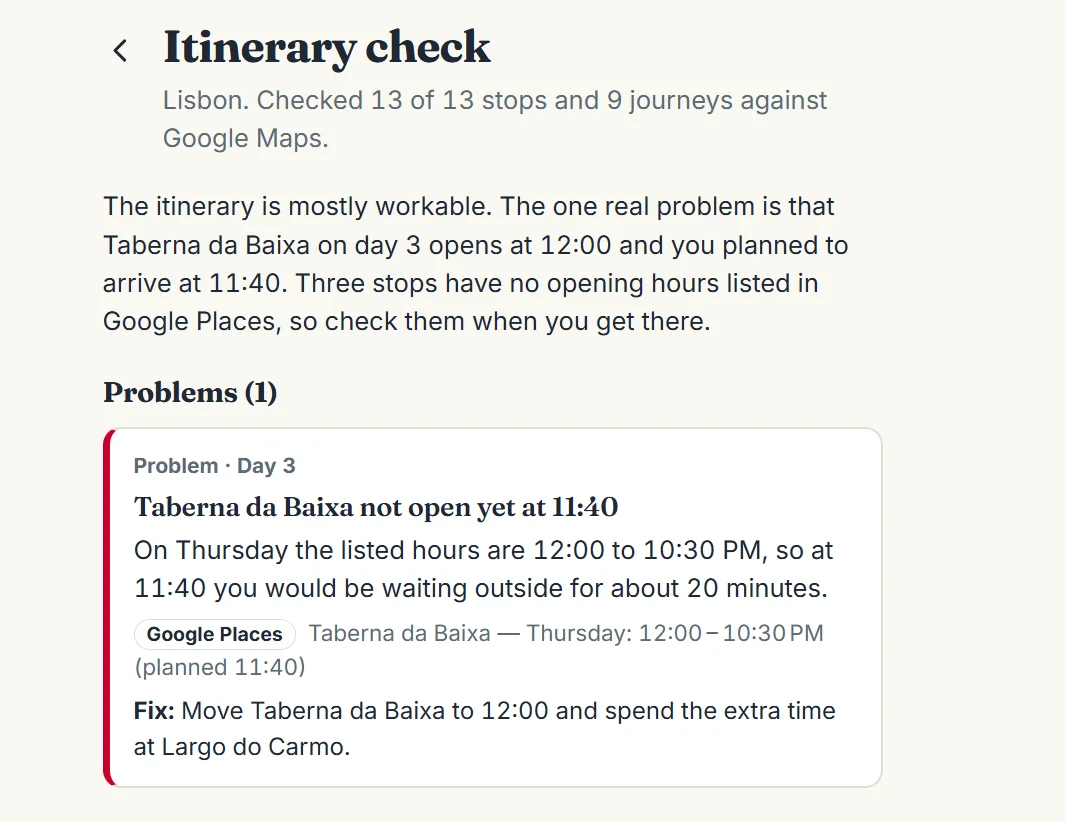
The check summary and its one problem. Screenshot from Amicly, 6 November 2026.
Here’s what the check found:
| Finding | Day | What Amicly said | Evidence |
|---|---|---|---|
| Problem | 3 | Lunch at Taberna da Baixa was planned for 11:40, but on Thursdays it opens at 12:00, so you’d wait outside for about 20 minutes. Fix: move lunch to 12:00 and spend the extra time at Largo do Carmo | Google Places hours: Thursday 12:00 to 22:30 |
| Tip | 1 | No opening hours listed for Rossio Square (Praça Dom Pedro IV), planned at 10:35 | Not verified: no hours on Google |
| Tip | 2 | No opening hours listed for Passeio das Tágides, planned at 13:55 | Not verified: no hours on Google |
| Tip | 3 | No opening hours listed for Largo do Carmo, planned at 10:55 | Not verified: no hours on Google |
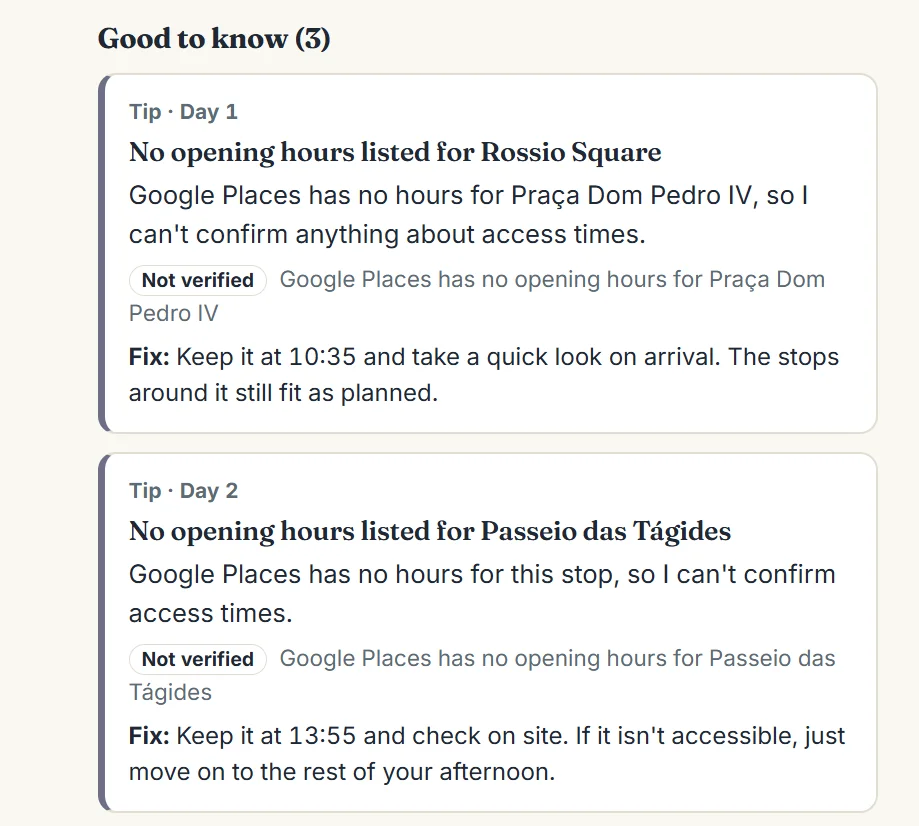
Places the check couldn’t confirm are labelled “Not verified”, not passed off as fine.
After the fix, day 3 keeps the same stops: Largo do Carmo from 10:55 with a longer stay, then lunch at Taberna da Baixa at 12:00, when it opens.
Four things stand out. First, a detailed prompt pays off: all 13 stops matched a real Google Maps listing and all 9 journeys between them could be timed, with no invented places. Second, "open that day" isn’t the same as "open at that time". ChatGPT’s own table listed Taberna da Baixa as open on Thursday, which is true, and still planned lunch 20 minutes before it opens. With a hungry 6-year-old on the last morning that’s the kind of slip you feel, and it only shows up when something compares the planned time with the hours. Third, the three tips are honest gaps: squares and a riverside walk don’t have opening hours, and the check says so instead of guessing.
Fourth, one thing no rule flagged is worth a second look: ChatGPT allowed 45 to 60 minutes from landing to the hotel and planned breakfast at 09:45. Our Lisbon arrival day guide plans on about 60 minutes to get out of the airport plus about 40 minutes by Metro, so a family with checked bags is more likely to sit down to breakfast after 10:00. Small, but it’s exactly the kind of number to give the AI yourself.
What the check didn’t cover: the table at Taberna do Lis (ChatGPT said it couldn’t check reservations), the museum’s ticket rules and any prices. Confirm those on their own sites. And this is one plan for one city on one day, not a study; your result will differ.
What does Amicly’s planner do with the same brief?
It takes the same facts as form fields and does the arithmetic and the rule checks in code, so you don’t have to write a long prompt or trust the AI’s word. Since 6 November 2026, the trip form asks who’s travelling (adults and each child’s age), where you’re staying, when you land and can check in, your last-day flight and leave-by time (worked out if you leave it blank), and up to six things you’ve already booked.
Here’s what the planner does with them, all in code rather than by the AI:
- Day 1 starts when you can actually start. It allows about an hour to get out of the airport, the transfer to your hotel, and 15 minutes to drop your bags. For this brief that’s out of the airport at 09:30, at the hotel at 09:55 by taxi, and the first stop at 10:10. ChatGPT had breakfast at 09:45.
- The last day ends in time. Sightseeing stops 30 minutes before your leave-by time, so you can collect your bags: 15:05 for a 15:35 departure.
- Booked times don’t move. Your 19:00 dinner stays at 19:00. A stop that would run into a booking or check-in is shortened, or dropped if fewer than 20 minutes are left, and the screen lists each change.
- Closed places are swapped. If Google lists a place as closed, the planner suggests a real, open place nearby for the same slot and looks it up on Google Maps before using it. In one of our test runs, Google listed the Santa Justa Lift as closed, and the plan used Miradouro de Santa Luzia instead.
- Your rules are checked and shown. A "Your rules, checked" list says yes or no for each one: bookings kept, day 1 after landing, the last-day cut-off, places per day (the hotel and rests don’t count), under 3 hours of travel a day, lunch and dinner on full days, meals at least 3 hours apart, an afternoon rest when you travel with children, and no long empty gaps.
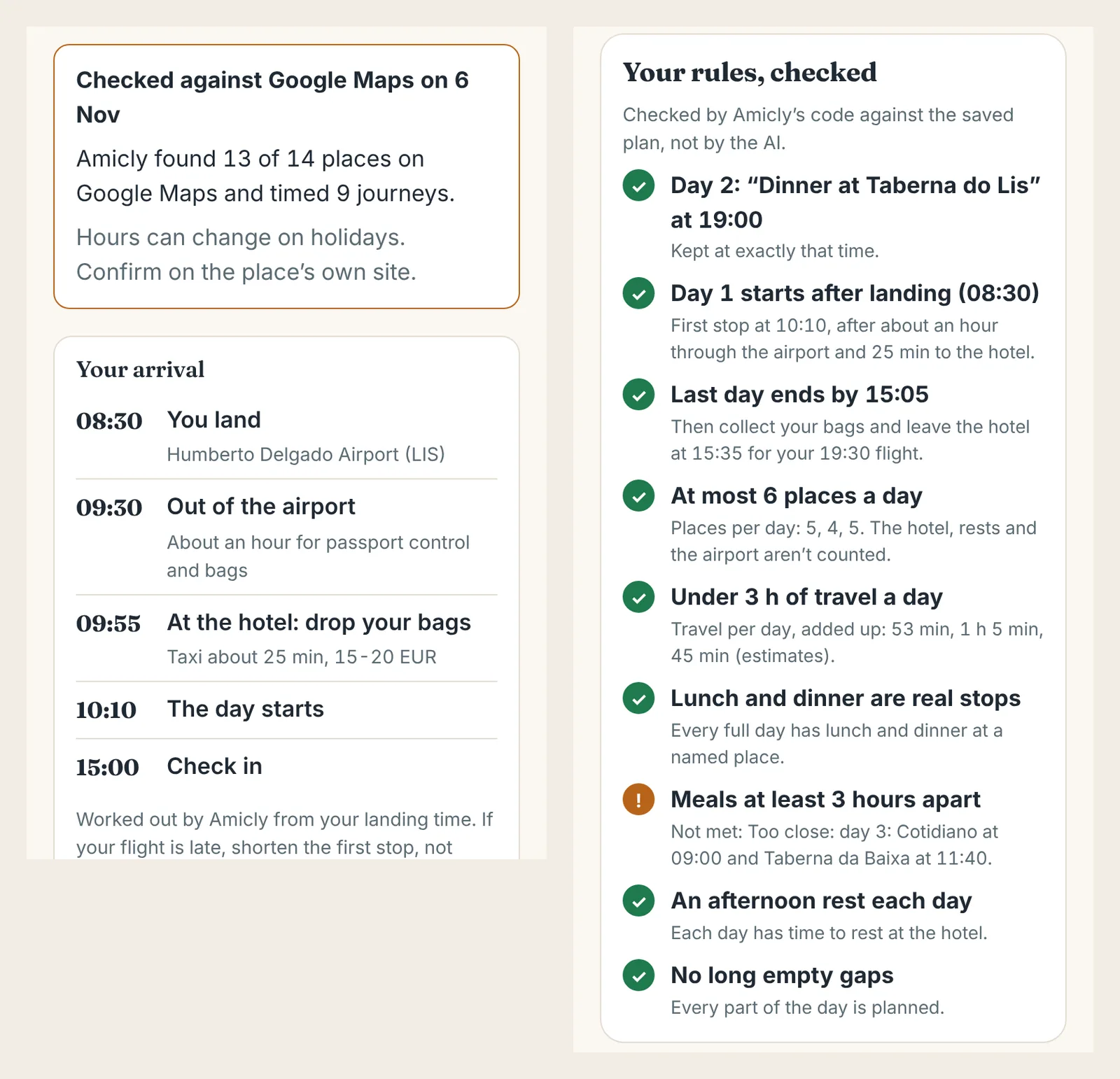
Amicly’s planner code run on ChatGPT’s own Lisbon stops in our test build, 6 November 2026. Google lookups were simulated in this test, so the place count isn’t a live result; the times and the rule checks are the app’s real code.
That test turned up something the itinerary check didn’t. ChatGPT planned brunch at Cotidiano at 09:00 for an hour and then lunch at Taberna da Baixa at 11:40. That’s 2 hours 40 minutes between two full meals, and the rules list marks "Meals at least 3 hours apart" as not met. It also marked ChatGPT’s "Bessa Restaurante(seafood restaurant )" as unverified, because no place on Google Maps has that name.
Each day also gets an "Open the whole day in Google Maps" button that starts from your hotel, a visit length and the journey time for every stop, a note for children on each stop, a rainy-day swap and the day’s total travel. The overview adds an at-a-glance table, airport transfer options with estimated prices, a tickets and bookings list, and a dated checklist for before you go that you can add to your phone’s calendar.
Two things ChatGPT still does that Amicly doesn’t yet: photos of each place, and a route map on the page. For now each day has the Google Maps button instead.
Should you use ChatGPT or a travel planner app?
Use ChatGPT to think, and a planner to hold the plan you’ll follow. They do different jobs:
| ChatGPT | Amicly | |
|---|---|---|
| Ideas and comparing destinations | Very good, any question | Not its focus |
| First draft of each day | Yes | Yes, written by AI at your pace |
| Places looked up on Google Maps | No | Every stop; unmatched ones labelled |
| Journey times between stops | Estimated in text | Timed with Google Routes |
| Closing days, holidays, pace | Only if you ask, from memory | Checked in code against your dates; closed places swapped |
| Who’s travelling, hotel, bookings | Only if you type them into the prompt | Form fields; booked times kept exactly |
| Arrival gap and leave-by time | Only if you give the numbers | Built into day 1 and the last day from your landing, check-in and flight |
| Your rules | Its own summary, written by the same AI | A yes or no for each rule, checked by code |
| Rain | A backup if you ask | A rainy-day swap for each day |
| Booked stops when you change the day | Can move them when it rewrites | Stay at their times when you re-plan |
| Photos and a route map | Yes | Not yet; an "Open the whole day in Google Maps" button |
| On the trip | A chat thread | Saved on your phone, opens offline |
| Cost | Free plan available | First plan, check, re-plan and arrival plan free |
A good way to combine them: brainstorm and choose in ChatGPT, then paste its plan into Amicly to check it, or let Amicly build the checked plan from the start. If you prefer to do it all by hand, how to make a travel itinerary walks through it in an evening, and the AI itinerary generator guide compares 13 AI planners on what their makers say they check.
Questions about planning a trip with ChatGPT
Is ChatGPT good for travel planning? For ideas, structure and wording, yes. For opening hours, journey times, prices and entry rules, no: check those on a map and on official sites.
Is it free to plan a trip with ChatGPT? ChatGPT has a free plan that can write itineraries. Paid plans add more use and features, but no plan checks your itinerary against a map for you.
Can ChatGPT make a Google Maps route? It can list stops in order and you can search them one by one, but it doesn’t create a route in Google Maps for you. Asking for exact Google Maps names makes the lookups quicker.
Does ChatGPT know opening hours? It knows typical hours from its training and, when it searches the web, what it finds there. Neither is guaranteed for your date. Check the place’s own site, especially on public holidays.
Should I use one long chat or start again for each change? Keep one chat per trip so it remembers your facts, and make one change per message. If it starts forgetting your times, paste your fixed facts again.
What’s the best way to use ChatGPT for a family trip? Say the children’s ages, ask for 3 to 4 stops a day with a rest after lunch, and give it your real landing and check-in times. Families feel a bad arrival day most. Our family travel itinerary guide has more.
Sources
- OpenAI Help Center: Does ChatGPT tell the truth? · checked 29 October 2026
- Travolution: SEO Travel study of 100 ChatGPT itineraries (May 2024) · checked 29 October 2026
- Greetwell: AI Travel Report 2026 · checked 29 October 2026
- PhocusWire: Expedia, Booking.com and Tripadvisor apps in ChatGPT · checked 29 October 2026
- Skift: Expedia and Booking.com launch ChatGPT apps (6 October 2025) · checked 29 October 2026
- Expedia: Expedia in ChatGPT · checked 6 November 2026
- Rick Steves’ Europe: AI for trip planning? Tread with caution (14 January 2026) · checked 29 October 2026
- Amicly app rules: arrival and departure timing (shared/arrivalDeparture/timing.js) and pace checks (api/_checks.js) · checked 6 November 2026
Spotted something out of date? Report a correction. How we review