Get the app
Get the app

AI travel planner

The AI travel planner that checks its own plan.

Any AI can write an itinerary that sounds right. Amicly writes yours, then checks it before you rely on it: every place looked up on Google Maps, the journeys between them timed, closing days and pace tested by code, and the hours between landing and check-in worked out around your bags. Anything it couldn’t check is labelled, not hidden.

Free to start with a free account. Your trips stay on your phone.

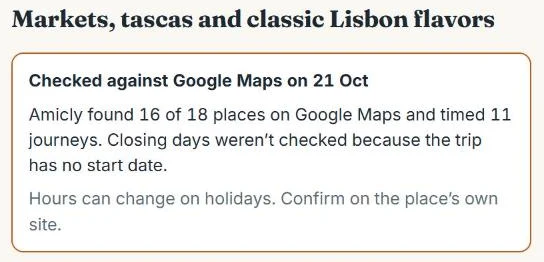
Amicly screen reading: Checked against Google Maps on 21 Oct. Amicly found 16 of 18 places on Google Maps and timed 11 journeys. Closing days weren’t checked because the trip has no start date.
A real Amicly screen: the check summary on a Lisbon plan. It even says what it didn’t check.

Why do AI itineraries go wrong?

Because a language model writes from memory. It can name a café that closed last year, put a museum on its closing day or send you across the city three times before lunch, and it says all of it in the same confident tone.

None of this makes AI useless for travel. It’s good at a first draft. The trouble starts after the draft, and that’s the part Amicly was built for.

What makes Amicly different

What Amicly does after the AI has written the plan

Places

Every place is looked up on Google Maps

Each stop is searched on Google Maps, and the result has to match the name the plan used. Google always returns its nearest guess, so a made-up name could otherwise “match” a real café nearby. Amicly compares the words, and anything that doesn’t fit is marked “Unverified: not found on Google Maps” instead of being passed off as real.

Real plan, 3 days in Lisbon, 21 Oct 2026: 16 of 18 places found, 11 journeys timed.

Checks

The rules run in code, not in the AI

Once the places are found, plain code tests each day: closed on that weekday, closed at the time you’d arrive, closed for good, a journey longer than the gap between two stops, a day trip where you’d spend less time there than getting there, doubling back to an area you already left, a national public holiday, rain or heat in the forecast, and more than 8 stops or 3 hours of travel in a day.

Where the fix is clear, code makes it: a whole day moves off a closing day, or sights are reordered between meals when that saves real distance.

Your times

Your flight and hotel times are never rewritten

The landing time, check-in time and airport you type stay exactly as you typed them. Code works out when to be at the airport, using these defaults: 3 hours before an international flight, 2 hours before a domestic one, 30 minutes before a train. Then your leave-by time: the airport time minus the transfer and a traffic margin of at least 15 minutes, or 25% of a long journey.

A flight after midnight gets the right date, and your airline’s advice always comes first.

Travel days

The awkward hours are planned, not skipped

Landing at 08:30 with the room ready at 15:00 is a real part of the trip, not a blank morning. Amicly plans that gap around your bags, your group and your energy. On the last day it works back from your flight, so the afternoon ends with a time to collect your bags and leave.

Each arrival or departure plan includes one free correction if a detail was wrong.

Changes

Re-plan the day without losing what you booked

Mark a stop “This is booked”. When rain or a closed door means changing the day, booked stops stay at their times and earlier stops stay as they were. The AI only suggests the free time. Nothing new lands in the 30 minutes before a booking or while it’s on (Amicly assumes about 60 minutes), and the screen says what was kept, moved, added or removed.

The re-planner also shows the weather for the next few hours.

Honesty

Labels you can trust, and a trip that stays on your phone

Every time on a plan says where it came from: your own input, a calculation, or an estimate marked “not checked live”. You won’t see a made-up confidence score. Your account is only for signing in: plans, kits and your hotel address are saved on your phone and open without a connection.

A request that fails never uses up your allowance.
A real plan, labels left in

What does a checked plan look like?

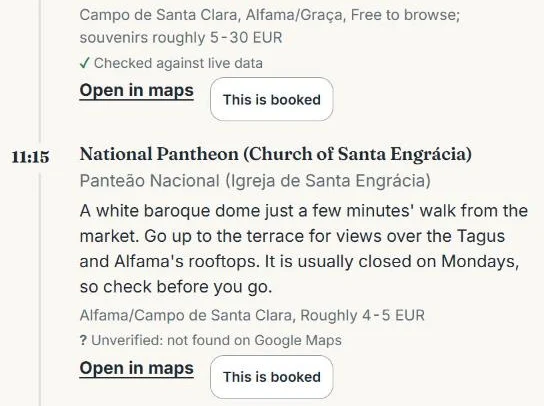
This is a real Amicly plan for three days in Lisbon, made on 21 Oct 2026. A flea market that only runs on certain days found its match on Google Maps. A church a few minutes away didn’t, so it says so.

That small question mark is the point. A plan that admits what it couldn’t confirm is one you can actually trust on the day. Every stop also has an “Open in maps” link, so you can look for yourself. For what a full trip plan should include and how to check it, see the travel itinerary guide.

Day 1 of the same plan, “Markets, tascas and classic Lisbon flavors”:

  1. Manteigaria ChiadoChiado · found on Google Maps
  2. Praça do ComércioBaixa · found on Google Maps
  3. Conserveira de LisboaBaixa · found on Google Maps
  4. Time Out Market LisboaCais do Sodré · found on Google Maps
  5. A GinjinhaRossio · found on Google Maps
  6. Taberna da Rua das FloresChiado · found on Google Maps
Two stops in an Amicly plan: the first is marked Checked against live data, the National Pantheon below it is marked Unverified: not found on Google Maps. Each stop has Open in maps and This is booked buttons.
Two stops from day 2 of the Lisbon plan, as they appear in the app.

How it works

How does Amicly build and check a plan?

  1. You choose

    Where you’re going, how many days, what you like and your pace: Relaxed is 3 to 4 stops a day, Balanced 4 to 6, Packed 6 to 7.

  2. The AI outlines the trip

    One theme and one main area for each day, so you aren’t crossing the city twice before lunch.

  3. Each day is written

    Real, named places in visiting order, with meals as proper stops. Days are written side by side to keep the wait short.

  4. Google Maps checks the places

    Every stop is looked up on Google Maps and the journeys between them are timed with Google Routes.

  5. Code tests the plan

    Opening days and hours, gaps, doubling back, pace, holidays and weather. Safe fixes are made; the rest is flagged on the stop.

  6. It’s saved on your phone

    With its labels, ready to open offline. If the page is interrupted while you wait, the request is kept on your phone and sent again, so the plan isn’t lost.

Create my itinerary

How is it different from a typical AI itinerary?

Most AI-written plans stop at the text. Here’s what changes when the plan is checked.

Common problems with AI-written itineraries compared with what Amicly does
Common with AI-written plansAmicly
PlacesNamed from memory, sometimes closed or made upLooked up on Google Maps; places it can’t match are labelled
Opening daysRarely checked against your datesChecked when you add dates; national holidays flagged
Getting between stopsGuessed, or left outTimed with Google Routes; long travel days flagged
Arrival and departureOften treated as a full day, or droppedPlanned from landing to check-in, and back to your leave-by time
Your flight and hotel timesCan be changed or forgottenNever changed by the AI
When the day changesStart the conversation againRe-plan the free time; bookings stay put
EstimatesSaid with the same confidence as factsMarked “not checked live”
Where your trip livesIn the tool’s account or a chat historyOn your phone; the account is only for signing in

What else does Amicly do for the trip?

Check an itinerary you already have

Paste a plan from ChatGPT, a blog or your notes. Amicly finds each place, times the journeys and runs the same rules. You get problems, then warnings, then tips, each with its evidence (Google Places, Google Routes or Amicly’s rules) and a suggested fix.

Plan the arrival and the last day

The hours between landing and check-in, and between checkout and your flight, planned around your bags and your group. How arrival plans work

Get ready before you fly

The Travel Kit lists the apps a country needs, with a checklist to finish at home, and keeps your hotel address in the local script to show a driver. China has a full kit today, marked not yet reviewed. Country guides

Check a price on the spot

Photograph a menu or a taxi fare. Amicly translates it, gives its view on whether it’s a fair local price, and converts it to your currency at a dated reference rate.

What doesn’t Amicly do?

Knowing the limits is part of trusting a tool, so here they are.

Who is Amicly for?

First time in a city

You want a plan that works on the ground, not a list of everything worth seeing.

Families with bags

An early landing, a room that isn’t ready and a tired child. The first and last days matter most.

Already got a plan

From ChatGPT, a friend or a blog. You want to know whether it holds up before you book around it.

Your trip stays yours

You’d like your trip to stay on your own phone, not in someone’s cloud. Amicly only asks for an email or Google sign-in.

What does it cost?

Free to start: 1 ai trip plan, 1 re-plan, 2 price checks, 1 itinerary check, 1 arrival or departure plan per city.

The Trip Pass ($12.99, 30 days, one payment) will add more. It isn’t on sale yet, so everything today uses the free allowance. Pricing details

Questions

Is Amicly’s AI travel planner free?

Your first AI trip plan is free. So are 1 re-plan, 2 price checks, 1 itinerary check and 1 arrival or departure plan per city. The Trip Pass will add more for 30 days.

How is Amicly different from asking ChatGPT for an itinerary?

A chat answer is written from the model’s memory and stops there. Amicly uses an AI for the first draft too, then looks up every place on Google Maps, times the journeys, runs its checks in code and plans arrival and departure from your real times. Anything it couldn’t check is labelled.

Can Amicly check an itinerary I already have?

Yes. Paste it into Check my itinerary, whether it came from ChatGPT, a blog or your own notes. You get problems first, then warnings and tips, each with its evidence and a suggested fix. Places it can’t match are listed as unverified, never guessed. Your first check is free.

Do I need an account?

Only for the AI. You can read the country guides and open saved trips without one. To make, check or re-plan a trip, you sign in with email or Google. Your trips stay on your phone; the account holds your email, how you sign in and your free-use counts.

Does it work offline?

What you’ve saved opens without a connection. Making or changing a plan needs one.

Does Amicly book flights, hotels or tickets?

No. Amicly plans and checks. Event links go to the ticket seller’s own page, and partner links are always labelled.

Which destinations can I plan?

Any city you type. The checks work wherever Google Maps knows the places; where it doesn’t, the stop is marked unverified.

Plan the trip. Then let Amicly check it.

Free to start, trips on your phone, and every estimate labelled.

Create my itinerary