An itinerary app that plans the trip and travels with you
Amicly is a free-to-start itinerary app for iPhone and Android. It builds a day-by-day plan around your destination, interests and pace, checks each place on Google Maps, plans your arrival and departure days, and keeps the trip on your phone so it opens without signal. You sign in with email or Google to use the AI, and you install it from the browser rather than an app store.
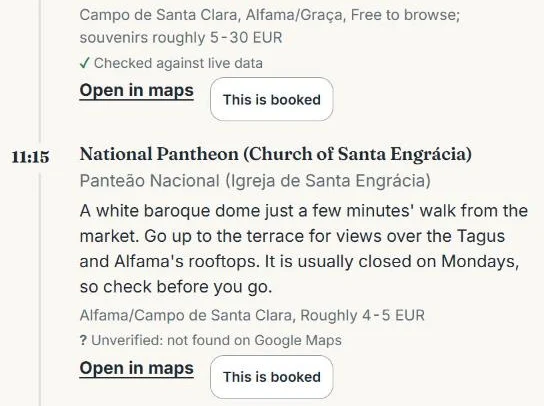
A real Amicly screen: two stops from a saved Lisbon plan, with what was checked and what wasn’t.
Amicly at a glance
Key facts about the Amicly itinerary app as of October 2026
What it does
Plans your trip day by day, checks the places and journeys, plans arrival and departure days and re-plans the day around what you’ve booked
Price
Free to start. A Trip Pass ($12.99 for 30 days) will add more uses; it isn’t on sale yet
Account
A free sign-in (email or Google) for the AI features. Trips stay on your phone
Phones
iPhone and Android, from the browser. Not in the App Store or Google Play yet
Offline
Saved trips, pinned apps and your hotel address open without signal. Making or changing a plan needs a connection
As of 26 October 2026. Allowances and prices are read from the app’s own code; see pricing for any change.
What should a good itinerary app do?
It should help you decide what to do each day and still be useful on the day itself, with no signal and a tired group. These are the questions worth asking of any itinerary app, with Amicly’s honest answer next to each.
Questions to ask an itinerary app, why each matters and how Amicly answers it
Question
Why it matters
Amicly
Does it plan the days, or only store bookings?
Some apps organise confirmations you already have. Others suggest what to do. You may need one, the other or both.
Plans the days from your destination, dates, interests and pace. It doesn’t import booking emails.
Are the places real and the journeys timed?
A tidy list can still include a closed café or a 40-minute hop between two “nearby” stops.
Each place is looked up on Google Maps and each journey timed with Google Routes. Places it can’t match are marked unverified.
What opens without signal?
You’ll read the plan in a station, a lift or abroad with no data.
Saved trips, plans, pinned apps and the hotel address open offline.
What does “free” include?
Free often means a trial or a feature list with the useful parts paid.
Your first AI trip plan is free, and each extra has a free allowance, listed in full below.
Do you have to make an account?
An account helps with syncing, but it’s one more login and your trip lives on someone’s server.
A free account (email or Google) for the AI features only. Trips stay on your phone, so there’s no automatic sync to another phone.
Can it handle travel days?
Arrival and departure days are where plans usually break.
Plans the hours from landing to check-in and from checkout to your leave-by time.
What happens when the day changes?
Rain or a closed door shouldn’t mean starting again.
Re-plan the free time; stops marked as booked keep their times.
What can you do with Amicly before and during the trip?
Plan at home, then use the same app on the road. Each part below is something the app does today.
Before you go
Build the days
Choose where you’re going, how many days, what you like and your pace: Relaxed is 3 to 4 stops a day, Balanced 4 to 6, Packed 6 to 7. Each day gets one main area, with meals as proper stops. How a plan is built and checked
Before you go
Check a plan you already have
Paste an itinerary from ChatGPT, a blog or your notes. Amicly looks up the places, times the journeys and lists problems first, each with a suggested fix.
Travel days
Plan the awkward hours
The gap between landing and check-in, and between checkout and your flight. For the last day it works back from the airport: 3 hours before an international flight, 2 before a domestic one, plus the transfer and at least 15 minutes for traffic. Arrival and departure plans
On the day
Re-plan without losing bookings
Mark a stop “This is booked”. When rain or a closed door changes things, booked stops keep their times and only the free time is rewritten. The screen says what was kept, moved, added or removed.
On the day
Show the driver your hotel
Save the hotel address and, where a country kit has it, show it in the local script. It opens offline.
On the day
Check a price
Photograph a menu or a taxi fare. Amicly translates it, says whether it looks like a fair local price and converts it at a dated reference rate.
Anything you’ve saved opens without a connection; anything that makes or changes a plan needs one. Here’s the full split, so you know what to do while you still have Wi-Fi.
What the Amicly itinerary app can do without a connection
Task
Without signal?
Do this before you lose signal
Open the app from your home screen
Yes
Install it once while you have a connection
Read saved trips and plans
Yes
Open the trip once before you leave to be sure it’s on this phone
Pinned apps and the hotel address for a driver
Yes
Add the hotel address before you fly
Country guides you’ve opened before
Yes
Open the guide at home
Create a new itinerary or an arrival or departure plan
No
Plan on hotel Wi-Fi or before you go
Re-plan, check an itinerary or check a price
No
Do these while you still have data
Maps, tickets and pages that open from a stop
Not by Amicly
Save offline maps and tickets in their own apps
If the page is interrupted while a plan is being made, the request is kept on your phone and sent again, so the plan isn’t lost. A request that fails never uses up your allowance.
Is the Amicly itinerary app free?
Yes, to start. Your first AI trip plan is free, and each extra has a free allowance. The Trip Pass ($12.99, 30 days, one payment) will add more uses, but it isn’t on sale yet, so everyone uses the free allowance today.
Free allowance compared with the planned Trip Pass
Feature
Free
Trip Pass (not on sale yet)
AI trip plans
1 plan
5 plans
Re-plans
1 re-plan
15 re-plans
Price checks
2 checks
30 checks
Itinerary checks
1 check
10 checks
Arrival or departure plans
1 per city
10 plans
Free uses are counted on your account; the arrival or departure plan is counted per city. Each arrival or departure plan also includes one free correction if a detail was wrong. Pricing details
How do you get Amicly on iPhone or Android?
You add it to your home screen from the browser. Amicly isn’t in the App Store or Google Play yet, so there’s nothing to download from a store, and the installed version updates itself.
iPhone: open Amicly in Safari, tap Share, then Add to Home Screen. On iOS 16.4 and later this also works from Chrome and Edge.
Android: open Amicly in Chrome and tap Install Amicly on the card at the top, or use Chrome’s ⋮ menu and choose Add to Home screen or Install app.
You can also keep using it in the browser without installing. The step-by-step install guide has the buttons for your phone and a QR code if you’re reading this on a computer.
Which kind of itinerary app suits your trip?
“Itinerary app” covers tools that do quite different jobs. Choose by the job, then check the one thing that usually catches people out.
Kinds of itinerary app, what each is good for and what to check
Kind of app
Good for
Check before you rely on it
Booking organisers
Collecting flights, hotels and confirmations into one timeline, often by forwarding emails
Whether it plans anything you haven’t booked, and which alerts are paid
Map-based planners
Building a route by hand, often together with friends
What opens offline and whether everyone needs an account
AI itinerary generators
A quick first draft
Whether places, opening days and journeys are checked, or only written
A document or spreadsheet
Full control and easy sharing
Nothing is checked for you, and it’s fiddly on a phone
Amicly
A checked day-by-day plan, travel days and the trip kept on your phone
No email import, no group syncing and no bookings
This is a guide to kinds of tool, not a tested ranking of named apps. Many travellers use two: one for bookings and one for the days. Prefer to build the plan yourself? Use the free travel itinerary template or the travel itinerary guide.
What doesn’t the Amicly app do?
It doesn’t book anything or read your booking emails, and it doesn’t sync between phones. Knowing that up front saves a surprise at the airport.
No bookings. No flights, hotels or tickets. Event links go to the ticket seller’s own page.
No email import or flight alerts. Keep confirmations with the airline, hotel or booking site.
No group syncing. The trip lives on the phone that made it.
Estimates are labelled. Transfer times and prices say “not checked live”. Confirm anything a booking depends on.
One full country kit so far. China, marked not yet reviewed. Other destinations get general travel apps and the country guides on this site.
How can you test an itinerary app before your trip?
Give it ten minutes with a short trip and aeroplane mode. These five steps work for any itinerary app, Amicly included.
1
Make a short plan
Pick a city you know and two days. You’ll spot a bad suggestion faster somewhere familiar.
2
Read one day in order
Look at the gaps between stops and how much of the day is travel, not just the names.
3
Look for the labels
Find which places were matched on Google Maps and which say unverified. A planner that hides this is guessing.
4
Mark a stop as booked and re-plan
Check that the booked stop keeps its time and only the free time changes.
5
Turn on aeroplane mode
Open the app from your home screen and read the plan. This is the moment that matters abroad.
Questions about the Amicly itinerary app
Is the Amicly itinerary app free?
Yes, to start. Your first AI trip plan is free. So are 1 re-plan, 2 price checks, 1 itinerary check and 1 arrival or departure plan per city. The Trip Pass will add more for 30 days; it isn’t on sale yet.
Is Amicly in the App Store or Google Play?
Not yet. You install it from the browser: Safari’s Share menu on iPhone, or Chrome’s install option on Android. It opens full screen like any other app and updates itself.
Do I need an account?
Only for the AI. You can read the country guides and open saved trips without one. To make, check or re-plan a trip, you sign in with email or Google. Your trips stay on your phone; the account holds your email, how you sign in and your free-use counts.
Will my trip appear on my other phone or my partner’s phone?
No. Trips are kept on the phone that made them, so there’s no automatic sync. Make the plan on the phone you’ll travel with, and share the details another way if your group needs them.
Does the itinerary work offline?
What you’ve saved opens without a connection. Making a plan, re-planning, checking an itinerary or checking a price needs one.
Can it import my booking emails?
No. Amicly plans the days and travel days. Keep confirmations in your email or the provider’s app, and mark a stop as booked when you have one.
Does Amicly book flights, hotels or tickets?
No. It plans and checks. Buy from the provider and keep their confirmation.
Plan the trip, then take it with you
Free to start, and your saved plan opens without signal.
Everything on this page about how Amicly works is taken from the app’s own rules and pages: allowances from the Trip Pass rules, travel-day timing from the arrival and departure rules, and offline behaviour from the install guide. How we review