Itineraries guide · Trip planning
Free travel itinerary template (Excel, Word and printable PDF)
A free, no-sign-up travel itinerary template in Excel, Word and PDF, with a daily plan, booking list and a leave-by calculator for travel days.
Short answer. Download the free template below in Excel, Word or PDF, or copy the tables straight from this page. Fill in fixed bookings first, then give each day one main area with a morning, lunch, afternoon and evening block. Mark every row Booked, Flexible or Optional, and use the arrival and departure section to work out the hours you really have on travel days.
This free travel itinerary template has a place for your bookings, a day-by-day plan and the awkward hours around arrival and departure. Download it in the format you like, or copy the tables from this page. There's no sign-up and no email gate.
Download the template
| Format | Best for | What's inside |
|---|---|---|
| Excel (.xlsx) | Editing on a laptop, Google Sheets, Numbers | Trip overview, bookings, 7-day plan, arrival and departure calculator, budget with totals, a filled-in example |
| Word (.docx) | Google Docs, Word, Pages | Trip overview, bookings, one page per day, arrival and departure worksheet |
| Printable PDF | Writing by hand, a paper backup | The same pages as the Word file, A4, three pages |
Both the Excel and Word files open in Google Sheets and Google Docs: upload them to Google Drive and edit them there, or convert them to Google's own format if you want to share and comment.
What makes this template different
Most free templates are a blank grid. That's fine until the trip starts and you can't tell which plans are fixed and which were just ideas. This one adds three things:
- A status for every row. Booked, Not booked, Flexible, Optional, Check opening day or Estimate. In the Excel file it's a drop-down. When a day goes wrong, you can see at a glance what you're allowed to drop.
- A leave-by calculator. Type your flight time, how early your airline wants you there, the transfer time and a buffer, and the sheet tells you when to be back at your bags. It does the same for arrival: when you'll reach the hotel and how many hours you have to fill before the room is ready.
- A backup column. Each day has room for the rainy-day or closed-door swap, so you're not searching for one on the spot.
Copy the trip overview
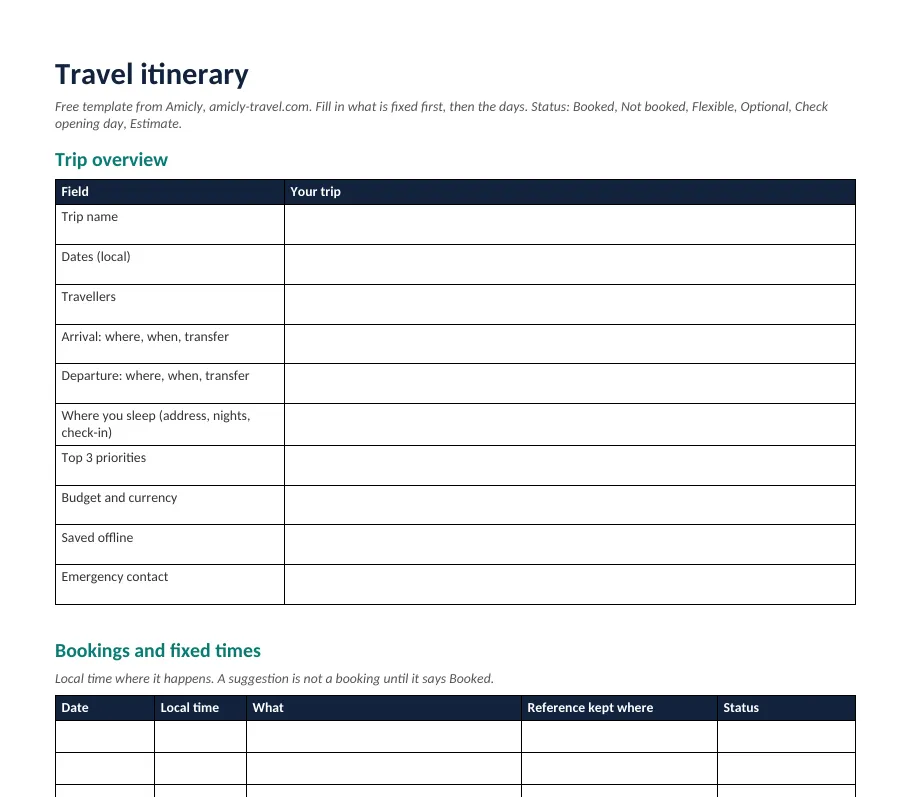
If you'd rather paste the tables into your own document, start here. Keep it short enough to read in ten seconds at an airport.
| Field | Your trip |
|---|---|
| Trip name | Destination or route |
| Dates (local) | Arrival date to departure date |
| Travellers | Group size, ages or needs that affect pace |
| Arrival | Airport or station, time, transfer plan |
| Departure | Airport or station, time, journey plan |
| Where you sleep | Name, address, nights, check-in and checkout times |
| Top 3 priorities | What you'd protect if a day goes wrong |
| Budget | Currency and what it covers |
| Saved offline | Tickets, hotel address in the local script, maps |
| Emergency contact | Someone at home with a copy of this plan |
Keep passport numbers and card details out of any copy you share or print.
Copy the booking list
Everything with a fixed time goes here first: flights, trains, hotel check-in, timed tickets, tours, a dinner reservation. Use the local time where each thing happens.
| Date | Local time | What | Reference kept where | Status |
|---|---|---|---|---|
| Flight, train, hotel or activity | Email, app or wallet | Booked | ||
| Next fixed item | Not booked |
A proposed visit isn't a booking. Keep the status column honest so a suggestion never looks like a confirmed ticket.
Copy the daily itinerary
Give each day one main area, then fill four blocks. Add a row for any journey that takes more than about 20 minutes, and another for collecting bags or changing hotels.
Day __ · Date · Main area · Today's priority
| Time or block | Plan | Travel to next | Status | Backup |
|---|---|---|---|---|
| Morning | Main activity | Time to first stop | Booked or Flexible | Indoor swap |
| Lunch | Near the morning stop | Flexible | ||
| Afternoon | Second area or main visit | Time and buffer | Booked or Flexible | |
| Evening | Dinner and the way back | Route to where you sleep | Flexible |
Morning, afternoon and evening blocks are enough for anything you haven't booked. Use exact times only for reservations, tours and departures.
Plan the first and last day properly
Travel days are where itineraries quietly fall apart: a long queue at passport control, a room that isn't ready, a train to the airport that takes longer than you guessed. The arrival and departure section turns those days into simple sums.
Arrival day. Landing time, plus getting out of the airport, plus the transfer, gives you the earliest time you'll reach the hotel. Compare it with the check-in time to see how many hours you need to fill. Keep that time light and close to the hotel. Our guide to what to do before hotel check-in covers the bags-and-tiredness problem in detail.
Departure day. Work backwards from the flight. Here's the example built into the Excel file:
| Step | Example |
|---|---|
| Flight departs | 18:40 |
| Be at the airport this long before (your airline's advice) | 2 h 30 |
| Transfer from your bags to the airport | 50 min |
| Collecting bags from the hotel desk | 15 min |
| Safety buffer | 30 min |
| Be back at your bags by | 14:35 |
| Checkout at 11:00 leaves you | 3 h 35 to use |
Those numbers are illustrative assumptions, not advice for a particular airport. Your airline's or train operator's instructions always win over any sum in a spreadsheet.
A completed example
This is a fictional three-day city break, included in the Excel file so you can see the layout filled in. The times show how the template works; they aren't checked travel times.
| Day | Time | Plan | Status | Backup |
|---|---|---|---|---|
| 1 | 07:15 | Land, passport control, collect bags | Estimate | |
| 1 | 09:00 | Leave bags at the hotel, breakfast nearby | Flexible | Café if the lobby is busy |
| 1 | 11:00 | Short walk to one viewpoint | Optional | Covered market |
| 1 | 15:00 | Check in, rest | Booked | |
| 2 | 10:00 | Main museum, timed ticket | Booked | |
| 2 | 12:30 | Lunch in the same area | Flexible | |
| 2 | 14:30 | Market and neighbourhood walk | Check opening day | Indoor gallery nearby |
| 3 | 11:00 | Checkout, bags at the desk | Booked | |
| 3 | 11:30 | One short visit near the hotel | Optional | Coffee and pack |
| 3 | 14:35 | Back at bags, leave at 14:50 | Booked |
Look at day 2. The museum has a fixed time, so it sits in the morning and doesn't move. The market is marked "Check opening day" because many markets run only on certain days, and it has a backup ready. Day 1 does almost nothing, on purpose.
Fill the template in this order
- Add what can't move. Flights, trains, where you sleep, check-in and checkout times. Check time zones, and whether an overnight journey arrives on a different date.
- Give each day a main area. Pin the places you want to see on a map and group the ones that sit close together. Crossing a city twice in one day is where most of the time goes.
- Book the timed things. Museums, tours and restaurants with time slots go in next, usually in the morning.
- Fill the gaps. Add travel time between stops, then meals, then a real break in the afternoon. Only after that, see if there's room for one more thing. Our guide to avoiding an overcrowded itinerary explains how much is too much.
- Mark the unknowns. Write "Estimate", "Not booked" or "Check opening day". A visible question is more useful than a precise-looking time nobody checked.
- Save a copy you can open offline. Open the finished file on your phone, then switch to flight mode and check it still opens. Google Docs and Sheets can be set to work offline, and Google Maps lets you download areas to use without data.
If you want the planning method itself in more depth, read how to make a travel itinerary, step by step.
What should the template hold at minimum?
At minimum: dates and places to sleep, every fixed booking with its local time, a plan for each day grouped by area, and the transfer details for arrival and departure. The useful extras are a status for each item, travel time between stops, a backup for bad weather, a budget line, and an emergency contact. If you're unsure what counts as an itinerary in the first place, what is a travel itinerary has short examples of each kind, and the travel itinerary guide covers every part in more depth.
Which format should you use?
- Spreadsheet if you want sortable rows, a budget that adds itself up, or the leave-by calculator.
- Document if you want a readable day-by-day page with room for notes, or you're planning with someone in Google Docs.
- Paper if you want a backup that doesn't need a charged phone. Print one daily page per day.
A template organises a plan; it doesn't check it. It won't tell you that a museum is closed on Mondays or that two stops are an hour apart. That part is still up to you, or to a planner that checks places against a map.
Can I use this as a Google Docs itinerary template?
Yes. Upload the Word file to Google Drive and open it in Google Docs. You can edit it as it is, or convert it to a Google Doc to share it and leave comments. Check the layout once after it opens, before you print.
Can I use it in Excel or Google Sheets?
Yes. The .xlsx file opens in Excel, Google Sheets and Apple Numbers. The calculator cells and budget totals use simple formulas, so they keep working after you upload the file to Google Sheets. Type times as hours and minutes, for example 18:40.
How detailed should the schedule be?
Exact times for anything booked, and for leaving to catch a flight or train. Blocks (morning, afternoon, evening) for everything else. More detail only helps if it changes a decision, like when to leave to reach a timed entry.
Can I use the template on my phone?
You can open all three files on a phone, but wide tables are hard to edit on a small screen. Fill the template in on a laptop, then keep a copy on your phone for reading. If you'd rather plan on the phone itself, a travel app that builds the days for you is easier than a spreadsheet.
Prefer a plan built for your dates?
If filling in a blank template feels like homework, Amicly’s AI travel planner can build the days for you. Tell it where you're going, your dates, interests and pace, and it makes a day-by-day plan with places checked against Google Maps. It's free to start and doesn't need an account. You can still copy the result into this template if you like having everything in one file.
For the bigger picture, including a real example and how to check a plan you already have, see the travel itinerary guide.
Sources
- Google Docs Editors Help: Work with Microsoft Office files · checked 24 October 2026
- Google Docs Editors Help: Work on Google Docs, Sheets and Slides offline · checked 24 October 2026
- Google Maps Help: Download areas and navigate offline · checked 24 October 2026
Spotted something out of date? Report a correction. How we review