Itineraries guide · Trip planning
AI itinerary generator: what each tool checks, and how to use one well
Thirteen AI trip planners compared on what their makers say they check, book and export, what the 2024 to 2026 studies found about AI itinerary errors, a prompt that works, and the 12 checks Amicly runs in code.
Short answer. An AI itinerary generator turns a destination, dates and interests into a day-by-day plan in seconds. It’s good at a first draft and at grouping nearby places, and weak at facts that change, such as opening days, journey times and whether a place still exists. Choose a tool that shows what it checked, give it your fixed times, and confirm every booked or time-critical stop yourself.
An AI itinerary generator writes a trip plan from a few lines of input. That part is solved: every tool on this page will give you a tidy day-by-day plan in under a minute. What separates them is what happens to the facts in that plan, and most tools say surprisingly little about it.
So this guide compares what the makers actually claim, collects what the studies found when people checked AI plans, and shows the checks that catch the usual mistakes. It’s part of our guide to itineraries.
What does an AI itinerary generator do?
It takes your destination, dates, interests and pace, and asks a large language model to write a plan, usually morning, afternoon and evening for each day. Some tools stop there. Others then look things up: places on a map, live hotel or flight prices, opening hours, or the time between stops.
That second step is the one to care about. A language model writes what sounds right from what it has read, so it can recommend a café that closed last year or put a museum on its closing day with complete confidence. A tool that checks its plan against live data, and tells you what it checked, catches some of that before you do.
Which AI itinerary generators are there, and what do they check?
Here’s what each maker says its tool does, from their own pages and announcements, checked on 29 October 2026. “Not stated” means we couldn’t find the maker saying so, not that the feature is missing.
| Tool | Cost to plan | Live data the maker mentions | Books inside the tool | Export or share |
|---|---|---|---|---|
| ChatGPT (with the Expedia and Booking.com apps) | Free, Go, Plus and Pro plans, logged in, outside the EU | Expedia says its app shows real-time hotel and flight prices | Booking.com’s app hands off to its own site to book | Not stated |
| Google AI Mode (Canvas) | Free in Google Search | Real-time flight and hotel data, Google Maps photos and reviews | Restaurant bookings with partners; available in the US, UK, India, Canada and Australia | Share by link |
| Google Gemini app | Free | Real-time options from Google Flights and Google Hotels | No, links out | Not stated |
| Microsoft Copilot | Not stated | Not stated | Announced in April 2025: flights, hotels and restaurants with partners, after you confirm | Not stated |
| Perplexity | Not stated | Not stated | Hotels, through Selfbook (2025) | Not stated |
| Expedia (Activity Planner, US) | Free in the app and on the website | Bookable tours and activities | Activities | Not stated |
| Booking.com AI Trip Planner | Free in the app (US, UK, Australia, New Zealand, Singapore) | Not stated | Through Booking.com | Not stated |
| Mindtrip | Not stated | Live hotel inventory from several suppliers | Flights (May 2026) and hotels (July 2026) in the chat | Not stated |
| Layla (owned by Expedia since July 2026) | Planning is free | Says it shows live prices | Through Layla’s travel experts or by you | Not stated |
| Wonderplan | Free, “at least for now” | None claimed | No | |
| Wanderlog | Free; the AI assistant and route optimisation are in Pro | Opening hours, address and reviews for each place | No | To Google Maps; plans saved offline |
| Tripadvisor Trips | Free | Hotel prices are estimates from past prices | No, it says it isn’t a booking agent | Not stated |
| Amicly | First plan free with a free account | Every stop looked up on Google Maps; journeys timed with Google Routes; public holidays and weather | No | Saved on your phone, opens offline |
Download the comparison: 13 AI trip planners compared (CSV), with a source link for every row. Features in this market change monthly, so check the maker’s page before you choose.
The pattern is clear enough. The big travel companies are adding AI to sell you the bookings they already sell. Very few tools say they check opening days for your dates or time the journeys between stops, which are exactly the two things that break most plans.
How often are AI itineraries wrong?
Often enough that you should assume at least one problem per plan. The studies we found, newest first:
| Study | Who and when | What it found |
|---|---|---|
| Greetwell AI travel survey | 1,000 US leisure travellers, 485 of them AI users, August 2026 | 16% of AI users had been recommended a place, tour or activity that didn’t exist; 27% got wrong prices or hours; 10% were sent to a business that had closed for good |
| Global Rescue | Its members, experienced international travellers, July 2026 | 36% had used AI for trip planning, up from 22% in January; 22% used it to build itineraries |
| Expedia Group and YouGov | 5,700+ adults in the US, UK and India, March 2026 | 40% use AI to help build itineraries; 66% wouldn’t trust AI to book for them |
| Phocuswright | US travellers, early 2026 | 56% had used AI for travel in the past 12 months, up from 33% a year earlier |
| SEO Travel | 100 ChatGPT itineraries, May 2024 | 90% had at least one error; 52% scheduled a visit outside opening hours; 24% included a closed venue; 25% involved backtracking |
The SEO Travel study is the only one that checked plans line by line, and it used an older model. But the 2026 surveys point the same way, and the failures in the news are the same kind. In 2025, two tourists in Peru set out for a “Sacred Canyon of Humantay” that an AI had described and that doesn’t exist, until a local guide stopped them. In January 2026, an AI-written tour company blog sent drivers in Tasmania looking for hot springs that had never been there.
For the longer version of this, with the 10-minute check, see can you trust an AI travel itinerary.
What should you type into an AI itinerary generator?
Your fixed times and your limits, as well as your interests. A generator can’t respect a 15:00 check-in it hasn’t been told about. This prompt works in any chat-based tool:
Plan [number] days in [city] from [weekday, date] for [who: two adults, or a family with children aged 4 and 8]. We land at [time] on day 1 and leave at [time] on the last day. Hotel check-in is [time], checkout [time], in [area]. We like [two or three interests]. Keep each day in one area, with no more than two main sights a day, lunch, and a break in the afternoon. For each sight, say if it needs a timed booking and whether it’s closed on any of our dates. Mark anything you’re not sure about.
Then push it with follow-ups:
- “Which of these places are closed on any of our dates?”
- “Move anything that needs a timed ticket to the morning.”
- “Make day 3 a slow day.”
- “Give me an indoor backup for each afternoon.”
- “What’s the walking time between each stop?”
Treat the answers to those follow-ups as claims to check, not facts. A model asked whether a museum is open will often say yes.
How do you check what an AI itinerary generator gives you?
Check every place exists, is open on that date at that time, and can be reached in the gap you’ve left. Those are the checks that catch most errors, and they don’t need an AI.
This is what Amicly’s checker does, in code, to every plan it writes and to any plan you paste into Check my itinerary:
| Check | What it looks for | The rule |
|---|---|---|
| Place found | The stop exists on Google Maps under that name | At least half the meaningful words of the name must match, or it’s marked unverified |
| Closed for good or for now | Google lists the place as permanently or temporarily closed | Flagged as a problem |
| Closed that day | The place isn’t open on the weekday of your date | Flagged as a problem |
| Closed at that time | The planned time falls outside the opening hours | Flagged as a problem |
| Hours unknown | Google has no hours for the place | A tip to check it yourself |
| Public holiday | Your date is a national public holiday | A warning, because normal hours may not apply |
| Times out of order | A stop starts before the one before it | Flagged as a problem |
| Overlap | A stop starts before the previous one can end | Flagged as a problem |
| Travel doesn’t fit | The journey is longer than the gap between stops | A warning, or a problem if it’s more than 30 minutes short |
| Day trip too short | A journey of an hour or more each way, with less time there than the journey | Flagged as a problem |
| Zig-zag | You leave an area and come back to within 1.2 km of it, via somewhere more than 1.5 km away | A warning, with the travel time wasted |
| Too much in one day | More than 8 stops, or more than 3 hours of travel | A warning |
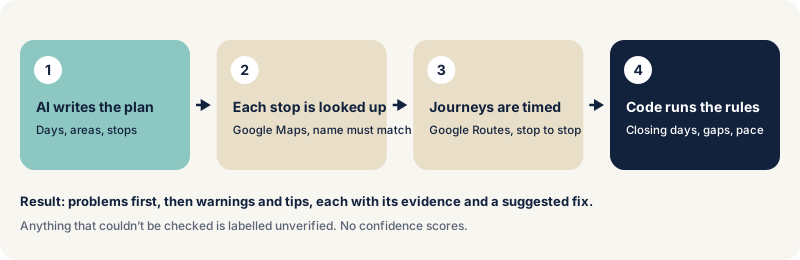
When it can, Amicly fixes problems in code before you see the plan: it moves a whole day off a closing day, and reorders sights between meals when that saves at least a kilometre and a fifth of the distance. Anything it can’t check is labelled, and it never shows a confidence score. A checked plan still isn’t a booking, so confirm anything time-critical on the venue’s own site. How Amicly’s AI travel planner works explains each step and its limits.
When is an AI itinerary generator the right tool?
When you need a first draft for a place you don’t know, or a fresh order for a list you already have. It’s fast at grouping places by area and at suggesting what fits between two fixed points.
It’s the wrong tool for anything where a mistake costs money or strands you: entry rules, visa requirements, ferry and last-train times, or a booking you can’t change. For those, use the operator’s or the government’s own page. And if you’d rather build the plan by hand, how to make a travel itinerary takes about an evening, with checks built into each step.
Questions about AI itinerary generators
Is there a free AI itinerary generator? Several. Google’s Gemini app and AI Mode, Wonderplan, Tripadvisor Trips and Booking.com’s planner are free to use, and Amicly’s first plan is free with a free account. Free usually means the plan isn’t checked against your dates.
Can ChatGPT plan a trip? Yes, it writes a good first draft, and with the Expedia or Booking.com app it can show hotels and flights. Check opening days, journey times and every booking yourself, or paste the plan into a checker.
Are AI travel planners accurate? Not reliably on facts that change. In the one line-by-line study we found, 90% of 100 ChatGPT itineraries had at least one error.
Does Google have an AI trip planner? Yes. AI Mode in Google Search can build a trip plan in a side panel called Canvas, using Google’s flight and hotel data and Maps reviews, and the Gemini app plans trips too.
What’s the difference between an AI itinerary generator and an AI travel planner? Mostly the name. Some use “generator” for tools that only write the plan and “planner” for tools that also book or check, but the industry doesn’t use the words consistently.
Sources
- Amicly dataset: 13 AI trip planners compared (checked 29 October 2026) · checked 29 October 2026
- PhocusWire: Expedia, Booking.com and Tripadvisor apps in ChatGPT · checked 29 October 2026
- Skift: Expedia and Booking.com launch ChatGPT apps (6 October 2025) · checked 29 October 2026
- Google: agentic plans and booking in AI Mode, Canvas (November 2025) · checked 29 October 2026
- Google: summer travel tips with Search and AI Mode (April 2026) · checked 29 October 2026
- Google Gemini: AI trip planner · checked 29 October 2026
- Windows Central: Copilot Actions (April 2025) · checked 29 October 2026
- PhocusWire: Perplexity hotel booking with Selfbook · checked 29 October 2026
- Hospitality Net: Expedia Group fall 2026 product release · checked 29 October 2026
- Skift: Expedia acquired AI trip planner Layla (31 July 2026) · checked 29 October 2026
- Booking Holdings: Booking.com AI-powered planning features · checked 29 October 2026
- Skift: Mindtrip, Sabre and PayPal launch agentic booking (6 May 2026) · checked 29 October 2026
- PR Newswire: Mindtrip launches Mindtrip Stays (15 July 2026) · checked 29 October 2026
- Layla: FAQ · checked 29 October 2026
- Wonderplan · checked 29 October 2026
- Wanderlog on the App Store · checked 29 October 2026
- Wanderlog: AI trip planner · checked 29 October 2026
- Tripadvisor: Trips · checked 29 October 2026
- Travolution: SEO Travel study of 100 ChatGPT itineraries (May 2024) · checked 29 October 2026
- Greetwell: AI travel survey 2026 · checked 29 October 2026
- Global Rescue: AI use for international trip planning (August 2026) · checked 29 October 2026
- Phocuswright: the fastest shift in travel behaviour (March 2026) · checked 29 October 2026
- Expedia Group and YouGov: the AI trust gap (April 2026) · checked 29 October 2026
- BBC News Brasil: tourists sent to a canyon that does not exist (4 October 2025) · checked 29 October 2026
- Euronews: an AI-written website sent tourists to hot springs that do not exist (30 January 2026) · checked 29 October 2026
Spotted something out of date? Report a correction. How we review