Apps and preparation
Japan phone setup checklist: what to do before you fly
Get data, a Suica or a plan for one, Visit Japan Web, taxi and train apps, offline maps and translation sorted at home, in the order that works.

Short answer. Before you fly to Japan, check your phone is unlocked, install a travel eSIM on home Wi-Fi, create your Visit Japan Web account, and download offline maps and the Japanese translation pack. On an iPhone you can add a Suica to Apple Wallet before you leave; most Android phones bought outside Japan can’t, so plan to buy a physical IC card on arrival. Sign up for taxi, train and messaging apps while your home number still receives their codes.
A phone that’s ready for Japan has five things done at home: it can get data, it can pay for trains, it holds your arrival QR codes, it has the apps that text you a sign-in code, and it works with no signal at all. Most of those jobs need home Wi-Fi or your home number, which is why they belong before the flight, not in the arrivals hall.
This guide puts the jobs in order, then answers the question most visitors ask: can I put a Suica on my phone?
What should I set up on my phone before going to Japan?
Start with data, because the other jobs lean on it. Then do the things that need your home number, then the downloads. Here is the whole list in order, as a picture first and in detail below.
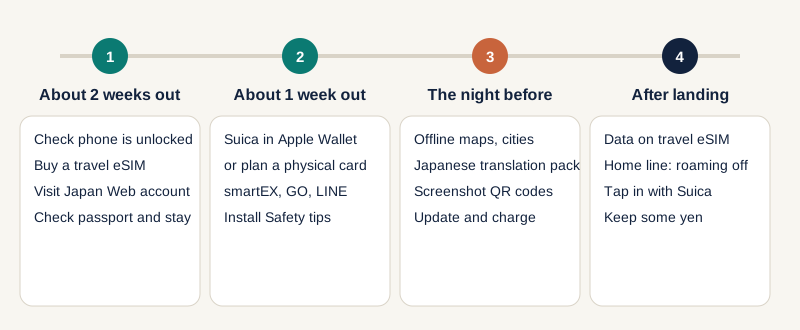
- Check the phone is unlocked. On an iPhone, open Settings › General › About and look for "No SIM Restrictions" next to Carrier Lock. A locked phone won’t take a travel eSIM or a local SIM.
- Buy and install a travel eSIM on home Wi-Fi. Apple says an iPhone must be connected to Wi-Fi or a hotspot to activate an eSIM abroad, with some eSIM-only models in certain regions the exception (Apple Support, checked 10 November 2026). Read when the plan’s days start counting: some providers count from install, others from first connection.
- Create your Visit Japan Web account. It’s the Digital Agency’s free service for immigration and customs, and it gives you QR codes to show on arrival. Our Japan guide notes the page doesn’t call it compulsory, but it is the easiest route. Screenshot the codes so airport Wi-Fi doesn’t decide your queue time.
- Sort your train payment. See the Suica section below.
- Sign up for the apps that send a code. GO (the taxi app) takes international phone numbers for its SMS code. smartEX, for the Tokaido and Sanyo Shinkansen, wants an email address and a credit card that supports 3D Secure; some debit and prepaid cards are declined. Which booking app you need depends on the line: our guide to Japan train apps matches each train to its app. LINE, widely used in Japan, also texts a code, so register with your own number before you leave.
- Install the Safety tips app and allow notifications. It’s the Japan Tourism Agency’s free app for earthquake, tsunami and weather warnings in English and other languages.
- Download offline maps and the Japanese translation pack. Do the cities you’ll visit in Google Maps, and Japanese in Google Translate. VoiceTra, a free speech translator from Japan’s NICT, is a second option; NICT briefly suspended an older build in August 2026 for a security fix, so update it before you go.
- Save the numbers. Police are 110, ambulance and fire 119. The Japan Visitor Hotline, 050-3816-2787, answers 24 hours a day.
Can I put a Suica on my phone as a tourist?
On an iPhone, yes. On most Android phones bought outside Japan, not yet. Suica is the rechargeable IC card for trains, buses and shops showing the IC mark, so how you get one decides how you’ll pay for most of a trip. Here are the options as of November 2026.
| Your phone | Option | What you need | What to know |
|---|---|---|---|
| iPhone 8 or later | Add a Suica, PASMO or ICOCA in Apple Wallet | An Apple Account with two-factor authentication, an eligible payment card in Wallet, current iOS | Wallet › Add › Transit Card › Add New Card, then choose an amount to load. Express Mode switches on with your first transit card, so you tap without opening the phone (Apple Support, updated March 2026) |
| iPhone or Apple Watch | Welcome Suica Mobile, JR East’s app for visitors | The app, a card in Apple Pay | Issues a Suica without membership or personal details. Issuing or topping up is blocked in some countries; if it fails at home, try again after you land (JR East, checked 22 October 2026) |
| Apple Watch | Suica on the watch | Apple lists Series 2 or later "purchased in Japan" for Suica | Check the watch you own against Apple’s page before relying on it |
| Samsung Galaxy | Welcome Suica Mobile for Galaxy | Not available yet | JR East said in April 2026 it’s planned for the first half of 2027 |
| Other Android phones bought outside Japan | A physical IC card, bought in Japan | A little cash or a card at the machine | Plan this as your main option, not a fallback |
Two details are worth knowing. If you move an existing physical card into Wallet, the plastic card stops working afterwards, and its balance moves across (Apple Support). And IC cards are being asked for in odd places: some station lockers don’t take cash at all, as the photos at Osaka Station in June 2026 show in where to store luggage after hotel checkout.
Our Japan guide also notes a growing number of rail lines now let you tap a contactless bank card at the gates. Carry some yen anyway: small restaurants, shrines and markets still lean on cash.
Which setup fits my phone?
Pick the row closest to yours. These are planning recommendations from the sources above, not results from testing devices.
| Your situation | Data | Train payment | Extra step |
|---|---|---|---|
| iPhone with a physical SIM slot and a home plan | Travel eSIM for data, home line kept for texts | Suica in Apple Wallet | Turn data roaming off on the home line |
| eSIM-only iPhone | Travel eSIM, or your carrier’s roaming pass | Suica in Apple Wallet | Activate on Wi-Fi unless Apple lists your region as an exception |
| Android with dual SIM | Travel eSIM for data, home line for texts | Buy a physical IC card on arrival | Put cash or a card aside for the machine |
| Samsung Galaxy | As Android above | Physical IC card for now | Check JR East again close to departure |
| Locked phone | Roaming pass from your carrier, or Wi-Fi only | As your phone allows | Ask your carrier about unlocking it |
How do I keep getting bank codes while using a travel eSIM?
Keep your home line on for calls and texts, and move data to the travel eSIM. Apple’s guidance for iOS 26 and later says if you use only the travel eSIM, FaceTime and iMessage keep working on your home line, and if you keep both lines on, you may still pay roaming fees on the home one. So turn data roaming off for the home line. Our guide on how to prepare your phone for international travel has the menu steps and the roaming-pass prices.
What should I download for use with no signal?
Maps, the translation pack, your hotel’s address in Japanese script and your tickets. Save boarding passes and hotel confirmations as files or in your phone’s wallet, not only as emails. In Google Maps, offline areas don’t give transit directions, so keep a mobile connection for train routing. If you’re shopping for gifts, remember that from 1 November 2026 the tax refund is claimed at departure, so keep your receipts reachable; see Japan’s tax-free refund.
What if something fails at the airport?
Work from the arrivals plan, not from a panic. Connect to airport Wi-Fi, open your saved QR codes, switch data to the travel eSIM in your phone’s settings, and buy a physical IC card if your wallet card didn’t take. Our arrival and departure planner turns your landing time into a realistic first-day timeline.
Questions people ask
Do I need an eSIM for Japan? No. Tourist eSIMs, airport SIM cards and pocket Wi-Fi are all easy to get, according to our Japan guide. An eSIM has the advantage that it’s ready before you land.
Can I add Suica to an iPhone bought outside Japan? Apple’s page says iPhone 8 or later works for Suica; it only restricts Apple Watch to watches "purchased in Japan". Check Apple’s page for your model, as it was updated in March 2026.
Does Android work with Suica? Most Android phones sold outside Japan can’t add one, and JR East has said Galaxy support is planned for the first half of 2027. Buy a physical card.
Do I need Visit Japan Web? It isn’t described as compulsory, but it’s the quickest way to arrival QR codes, and it’s also used for the new tax-free departure check at major airports.
For the full set of apps, entry rules and the refund process, use the Japan travel apps guide.
Sources
- Apple Support: Add a transit card to Apple Wallet in Japan (updated March 2026) · checked 10 November 2026
- Apple Support: Use an eSIM while travelling internationally with your iPhone · checked 10 November 2026
- JR East: Welcome Suica Mobile · checked 22 October 2026
- JR East press release on Samsung Galaxy support (April 2026) · checked 22 October 2026
- Digital Agency: Visit Japan Web · checked 22 October 2026
- smartEX: How to register · checked 22 October 2026
- Japan Tourism Agency: Safety information for visitors · checked 22 October 2026
- NICT: VoiceTra service update (August 2026) · checked 22 October 2026
Spotted something out of date? Report a correction. How we review