Before you buy a timed ticket
Put the ticket time into the day you actually want, lunch and the journey to the entrance included. If it only works with a rushed meal or a perfect connection, book a later slot before you pay.
Travel itinerary planner
Your museum ticket says 14:00. Lunch is across town, and the train you’re counting on leaves 25 minutes late. Do you still sit down for lunch, or go straight to the museum?
Rehearse a day is the part of Amicly’s travel itinerary planner that lets you make that decision at home. Pick a day, make a stop run late or close, and see which part of the plan breaks first. Amicly then offers up to three Plan Bs, shows the delayed day and the fix side by side, and changes your plan only if you apply one. It runs without AI, it’s free, and it doesn’t need an account.
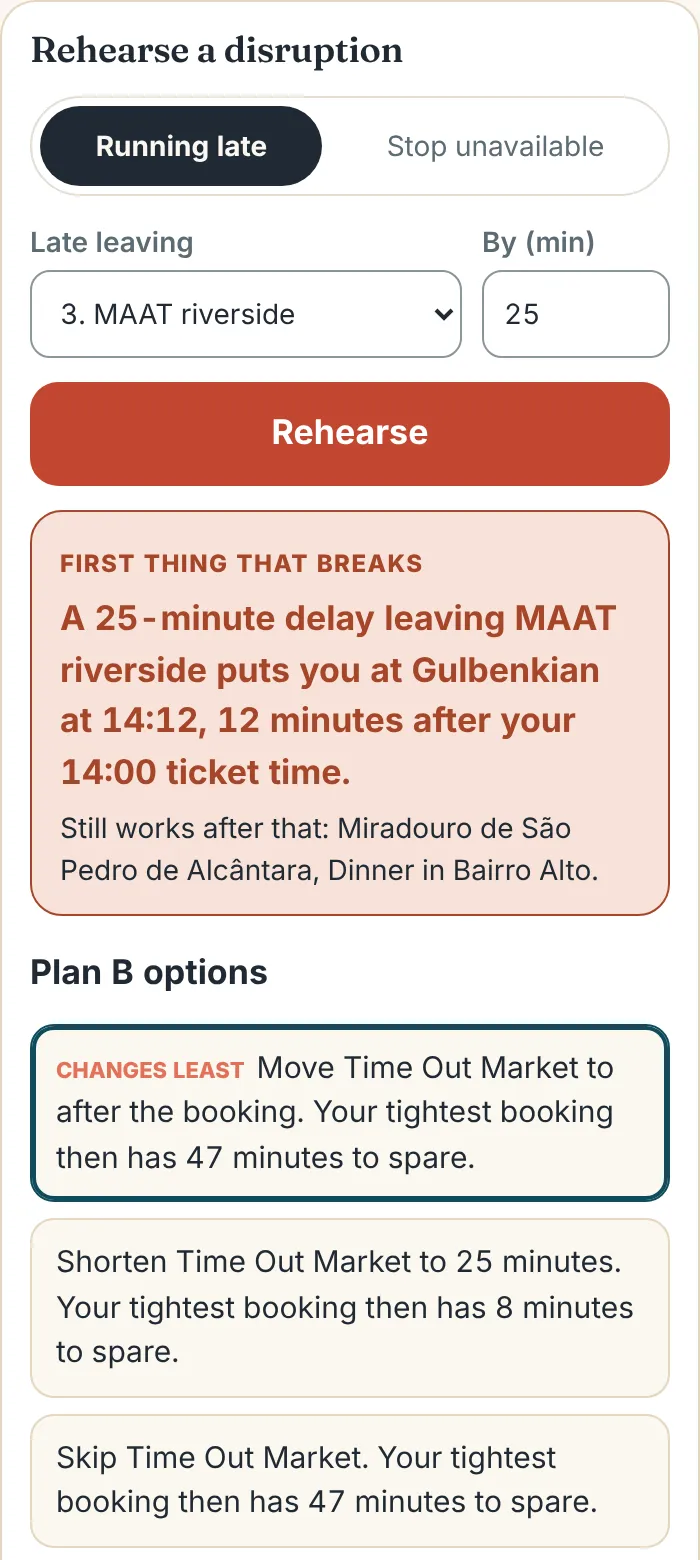
It’s a what-if test of one day of travel. Amicly works through the stops in order, using each visit’s length, the journeys between stops and any fixed times, and shows how one change spreads through the rest of the day.
The useful part is seeing where the delay lands. You might have a whole hour before dinner and only 13 minutes before a museum ticket. An afternoon can look relaxed until you see which gap has to absorb the train, lunch and the walk from the station. Once you know that, you can move one stop and keep the parts you were looking forward to.
A rehearsal is different from a checklist of “leave plenty of time”. It gives you the actual minute you’d reach the door, the booking that suffers first, and what still works after it.
It turns a 13-minute margin into a 12-minute miss. In Amicly’s Lisbon demo, you leave MAAT riverside at 12:15, take a 25-minute train to Time Out Market, have a 45-minute lunch and ride the metro for 22 minutes to the Gulbenkian Museum. You’d arrive at 13:47 for a 14:00 ticket.
Now leave MAAT 25 minutes late and keep everything else. You reach the museum at 14:12. Amicly says so in one line, and lists what still works afterwards: the viewpoint at 17:00 and dinner in Bairro Alto at 19:30.
Then it offers three ways back, ordered by how little they change:
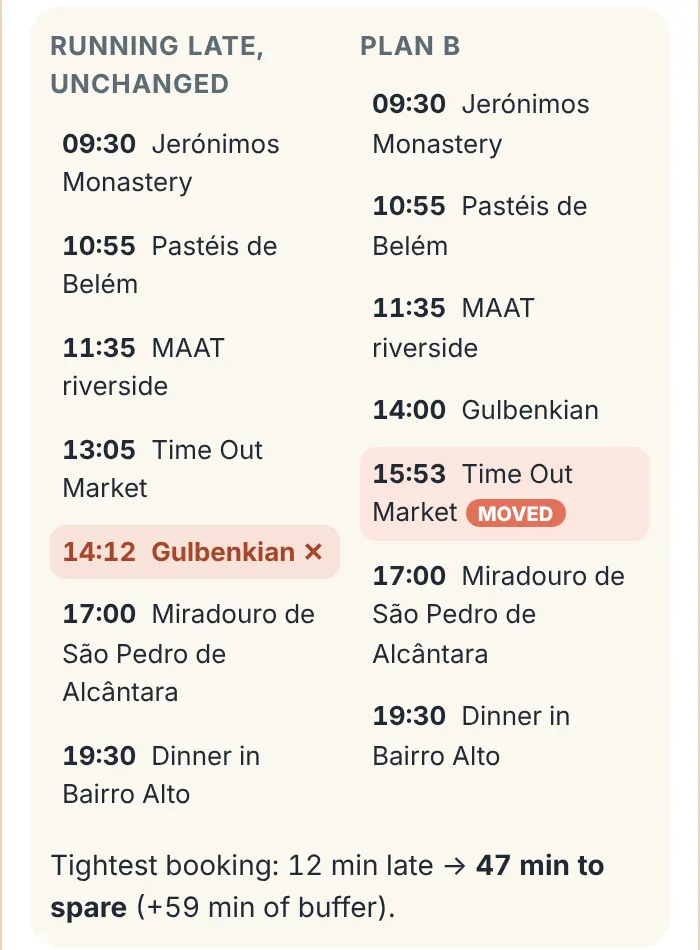
| Part of the day | Original plan | 25 minutes late, same plan | Plan B: shorter lunch | Plan B: lunch after the museum |
|---|---|---|---|---|
| Leave MAAT riverside | 12:15 | 12:40 | 12:40 | 12:40 |
| Lunch at Time Out Market | 12:40 to 13:25 | 13:05 to 13:50 | 13:05 to 13:30 | After the museum, from 15:53 |
| Reach the museum | 13:47 | 14:12 | 13:52 | Well before 14:00 |
| Against the 14:00 ticket | 13 minutes spare | 12 minutes late | 8 minutes spare | 47 minutes spare |
A worked example from Amicly’s Lisbon demo, run on 6 November 2026. The demo’s journey times and the 14:00 ticket are sample inputs, labelled as demo data in the app; the journey from MAAT straight to the museum in the last column is Amicly’s own estimate. Use the venue’s current instructions and a real route for your own visit.
Rehearse the day with the most at stake, give every stop an honest length and a level of flexibility, then try one realistic delay and compare the fixes. It takes about five minutes a day.
Open Amicly and choose Rehearse a day on the Trip screen. Paste your plan with one stop per line, add the destination and the first day’s date, and choose Preview. Check the order, times and places, then choose Import and rehearse. Already have a saved Amicly trip? Open it and choose Rehearse this trip.
Pick the day built around a timed ticket, a tour, a dinner reservation or a departure. Times are local to the destination. If you’re pasting a draft from ChatGPT, a blog or your notes, this format works:
Day 1
11:35 MAAT riverside (40 min)
12:40 Time Out Market (45 min)
Calouste Gulbenkian Museum, 90 min, ticket 14:00
19:30 Dinner in Bairro Alto (90 min) booked
Amicly reads the visit lengths, “ticket 14:00”, “booked” and “optional”. A stop with no start time is placed after the one before it, and a stop with no length gets a typical one, labelled as assumed. If a name could mean several places, like “Gulbenkian” in Lisbon, you pick the right one; Amicly never guesses.
Each stop is Fixed, Flexible or Optional. Fixed is for times you’ve committed to, from an actual confirmation. Flexible is a stop you’d like to keep that could move or shrink. Optional is the extra viewpoint or second café you’d happily drop to save the rest of the day.
A restaurant you’ve saved because you like the menu is flexible until you have a reservation. For a timed ticket, read the arrival instructions: the time you need to be at the entrance can be earlier than the time on the ticket.
Select a stop on the illustrated map or the timeline to see the journey to the next place, the time available and the minutes left over. A short line on the map can still mean a river crossing, a change of platforms, a long walk to the right entrance, or a slower pace with luggage or children.
Look twice at stops with no location or an assumed visit length. And if you edit a day, Amicly lists Checks reopened by this change: a journey time worked out for the old order may not fit the new one.
Choose Running late, pick the stop you’d leave late and the minutes, then Rehearse. Or choose Stop unavailable to see the day without a market that’s closed or a café that’s full. Amicly shows the first thing that breaks, what still works, and up to three Plan Bs.
Open each Plan B to compare it with the delayed day. When you’re happy with the trade-off, choose Apply this Plan B. If no small change works, decide which commitment matters most and contact that provider.
Yes. On any imported day, Check this day on Google Maps looks up every stop on Google Maps, adds that date’s opening hours, flags places Google lists as temporarily or permanently closed, and times each journey with Google Routes, leaving at the time your plan has you leave. The rehearsal then uses those results.
When we checked a Rome day for Monday 16 November 2026 on 5 November 2026, Amicly found all three stops (the Pantheon, the Trevi Fountain and the Galleria Borghese). Google listed the Galleria Borghese as closed on Mondays, which breaks the day, and timed the Pantheon to the Trevi Fountain as a 9-minute walk and the Trevi Fountain to the Borghese as 17 minutes by public transport, leaving at 12:00.
A few things to know:
Every opening time, ticket and journey in a rehearsal says where it came from, so you know which details deserve a second look before you book or leave.
| Label | What it tells you | What to do |
|---|---|---|
| Source checked | Amicly has a source for the detail, with the date it applies to. | Open the source and check the date, especially around holidays. |
| Traveler confirmed | You entered it yourself, such as a ticket time. | Keep the confirmation and follow the provider’s instructions. |
| Estimated | A typical value, such as a journey worked out from the distance. | Check the route and allow for waiting, walking and finding the entrance. |
| Needs checking | Missing, or the plan changed since it was checked. | Confirm it before a booking or connection depends on it. |
| Conflicting sources | Two sources disagree. | Use the venue’s or operator’s current information for your date. |
| AI suggestion | An idea, not a fact. It isn’t used in the timings. | Confirm it, or ignore it. |
Put the ticket time into the day you actually want, lunch and the journey to the entrance included. If it only works with a rushed meal or a perfect connection, book a later slot before you pay.
A slow breakfast, a toilet stop and getting everyone out of the hotel all take time. Use visit lengths that suit your group, then agree which stop is easiest to move or drop if lunch runs long.
Rehearse the journey that puts your must-see at risk, and the route back to the station or hotel. An optional stop near your main booking gives you more room than one across town.
A rehearsal protects a good itinerary instead of replacing it. Often the answer is a shorter lunch or one extra gap, a much smaller job than planning the day again.
For how Amicly writes and checks a whole trip, see the AI travel planner. For what a full plan should include, read the travel itinerary guide, and if every day feels tight, how to avoid an overcrowded itinerary.
Check my itinerary reviews a whole draft with AI and Google Maps and lists the problems it finds. Rehearse a day takes one day and asks a what-if question: what breaks first if you leave a stop 25 minutes late, or lose a stop, and which small change gets the day back. Check the draft first, then rehearse the day you most want to protect.
Allow for the whole journey, not just the ride: getting to the stop or station, waiting, the ride itself and reaching the right entrance. Add the time a venue asks you to arrive early, then a margin that suits your group. Work back from the fixed time. A short walk to a café and a train to a timed tour need different margins.
Yes. Paste the text into Rehearse a day, one stop per line, and fill in what the draft left out in the preview: the date, the exact places, realistic visit lengths and the times of anything you’ve booked.
No. A rehearsal shows what would happen. Your saved plan only changes when you choose Apply this Plan B, and fixed bookings keep their times. Amicly never contacts a venue, so change or cancel tickets with the provider yourself.
No. The rehearsal and the Lisbon demo run in your browser without AI and without signing in. A free sign-in (email or Google) is only needed for the Google Maps parts: finding places that aren’t recognised and checking a day’s opening hours, closures and journey times.
Yes. Rehearsing, comparing a Plan B and applying it are free and don’t use any of your free AI allowance. The Google Maps checks are free with a sign-in and don’t use your trip plans either.
Yes, with the Google Maps check. Without it, places Amicly doesn’t recognise stay as you typed them, and journeys to and from them are assumed and labelled, so add coordinates or run the check for a city outside the demo.
Pick the day with the tight connection or the booking you’d hate to miss, and give it a 25-minute delay. If it holds, you know where your slack is. If it breaks, you’ll see the smallest change that fixes it.
How Rehearse a day works is taken from the app itself: the Lisbon figures are its demo output, the labels are read from its code, and the Rome example is a real check run on 5 November 2026. Opening hours and journey times from Google can change. How we review