Apps and preparation
Does Google Maps work in China? What works instead, and why the map looks shifted
Google is blocked on Chinese networks and its mainland map is shifted by 340 to 620 metres. Which map app to use instead, and how your phone connection changes the answer.

Short answer. Not reliably. Google is blocked on mainland Chinese networks, so Google Maps won’t load on a Chinese SIM or hotel Wi-Fi without a VPN. With home roaming or many travel eSIMs it usually loads, but China’s mapping rules shift the street map by roughly 300 to 600 metres from GPS, so your blue dot can look off. For getting around, use Amap (which has had an English version since 2025) or Apple Maps on an iPhone, and keep Google Maps for Hong Kong and Macau, where it works normally.
Google Maps is the first app most visitors open in a new city, and mainland China is where it lets them down. Two separate things go wrong. Google is blocked on Chinese networks, so the app often won’t load at all. And even when it does, China’s mapping rules mean its street map is drawn a few hundred metres away from where GPS says you are.
Here’s what works on each kind of connection, how big the shift really is (we calculated it for ten cities), and which map app to set up before you fly.
Does Google Maps work in China?
Not on Chinese networks. The UK government’s travel advice for China says that some services are permanently blocked, including Google, so on a Chinese SIM card or on hotel, café or airport Wi-Fi the app won’t load maps or search.
It’s different in Hong Kong and Macau. Their internet isn’t blocked in the same way, and mainland mapping rules don’t apply there, so Google Maps works as it does at home.
Can I use Google Maps with roaming or an eSIM?
Often, yes. With roaming on your home SIM, your data is usually routed back through your own operator’s network, so blocked services can load as they would at home. Many travel eSIMs work the same way: Holafly, for example, says its eSIM connects outside China’s network, so blocked apps work. It depends on the provider, so check before you buy rather than after you land.
| Your connection | Does Google Maps load? | Is the map accurate? | What we’d use |
|---|---|---|---|
| Home SIM, roaming | Usually | Shifted 300–600 m on the mainland | Amap or Apple Maps, with Google as a backup |
| Travel eSIM that routes outside China | Usually | Shifted 300–600 m on the mainland | Amap or Apple Maps |
| Chinese SIM card | No | n/a | Amap or Apple Maps |
| Hotel, café or airport Wi-Fi | No | n/a | Amap or Apple Maps |
| Any connection with a VPN | Often, if the VPN connects | Shifted 300–600 m on the mainland | See the note on VPNs below |
| Hong Kong or Macau, any connection | Yes | Accurate | Google Maps is fine |
A note on VPNs. The UK’s travel advice says China’s cybersecurity laws require online products and services such as VPNs to be licensed by the Chinese government. Plenty of visitors use them, but we don’t recommend relying on one for something as basic as finding your hotel.
For the rest of the phone set-up, including keeping your home number for bank codes, see how to prepare your phone for international travel.
Why is Google Maps shifted in China?
Because of the law. Private surveying and mapping has been illegal in mainland China since 2002, and maps published there must use an official coordinate system called GCJ-02. It moves every point by a varying amount compared with the WGS-84 system that GPS uses.
In Google Maps, the street map of mainland China is drawn in GCJ-02, but the satellite photos are not. So your phone’s GPS position lines up with the satellite view but not with the street map. That’s why travellers describe their blue dot sitting on a parallel street or across a river.
To put a number on it, we took the published coordinates of 21 well-known places and ran them through the public, open-source version of the GCJ-02 formula. In every mainland city we checked, the map is moved between 340 and 620 metres:
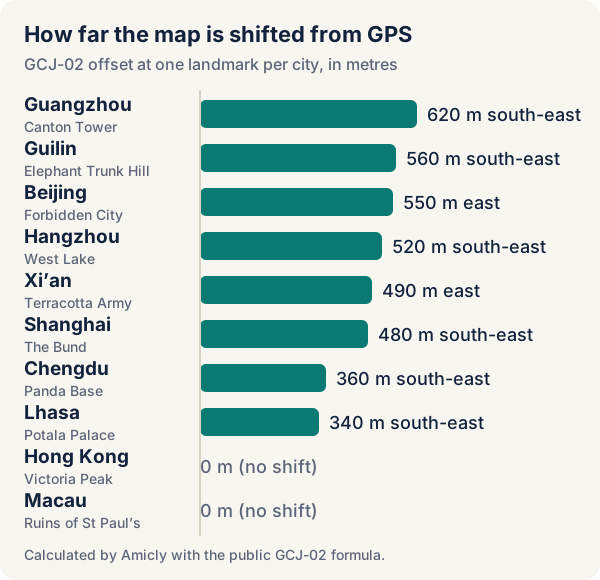
| City | Place we checked | How far the map is moved | Direction on the map | Where your GPS dot appears |
|---|---|---|---|---|
| Beijing | Forbidden City | 550 m | East | About 550 m west of where the map shows you |
| Shanghai | The Bund | 480 m | South-east | About 480 m north-west |
| Xi’an | Terracotta Army | 490 m | East | About 490 m west |
| Chengdu | Panda Base | 360 m | South-east | About 360 m north-west |
| Guangzhou | Canton Tower | 620 m | South-east | About 620 m north-west |
| Hangzhou | West Lake | 520 m | South-east | About 520 m north-west |
| Guilin | Elephant Trunk Hill | 560 m | South-east | About 560 m north-west |
| Lhasa | Potala Palace | 340 m | South-east | About 340 m north-west |
| Hong Kong | Victoria Peak | 0 m | No shift | Accurate |
| Macau | Ruins of St Paul’s | 0 m | No shift | Accurate |
Five hundred metres is six or seven minutes’ walk, or the wrong side of a big road junction. It also explains a problem people rarely connect to maps: a pin or coordinates copied from one app can land in the wrong place in another. If you take a location from a GPS-based source, such as a photo’s location or a pin from a blog, and paste it into a Chinese map app, it can land about half a kilometre away.
Download our calculation: the shift at 21 places as a CSV, with each place’s GPS and GCJ-02 coordinates. The formula is a public reconstruction, so treat the figures as accurate to a few metres rather than exact.
What is the best map app for China?
Amap, also called Gaode, for most visitors, and Apple Maps if you have an iPhone and want to keep things simple. Both use Chinese map data, so the blue dot matches the map, and both work without a VPN.
| App | English | Works without a VPN | Transit directions | Good to know |
|---|---|---|---|---|
| Amap (AMap Global) | Yes, since January 2025; 14 more languages since July 2025 | Yes | Yes, plus walking, cycling and driving | Has English ride-hailing. Klook’s guide says you need to be signed in for offline maps, and that you can sign up with an email |
| Apple Maps (iPhone) | Widely reported, but Apple doesn’t list it for the mainland | Yes | Check in the app for your city | In China it uses Amap’s map data and doesn’t need an Apple Account sign-in, says Apple |
| Baidu Maps | Partly: an English map launched in January 2025, starting with Beijing | Yes | Yes | Most of the app is still in Chinese |
| Google Maps | Yes | Only through roaming, some eSIMs or a VPN | Limited on the mainland | Street map shifted 300–600 m. Fine in Hong Kong and Macau |
Amicly’s China kit, still a draft until we finish reviewing it, makes the same call: install Amap at home, switch it to English and save your hotel in it before you go.
How do I set up Amap before I go?
Do it at home, on Wi-Fi, before you fly:
- Install AMap Global from your phone’s app store.
- Switch the language to English in the settings.
- Create an account with your email if you want offline maps, then download the cities you’re visiting.
- Search for your hotel and save it. Copy its address in Chinese characters too, so you can show it to a taxi driver.
- Practise one route, such as the airport to your hotel by metro, so you know where the transit options are in the app.

If you’ll pay with your phone, set that up at home too. Our guide to using Alipay as a tourist covers it, including the fee above ¥200.
Can I download Google Maps offline for China?
Don’t count on it. Google’s help page says you can’t download offline maps in some countries or regions, for reasons including contractual limits and address formats. It doesn’t say which, and travellers report mixed results for China. Even where a download works, Google says transit, cycling and walking directions aren’t available offline, and the map would still be shifted. Download Amap’s offline cities instead.
Is Google Maps out of date in China?
Probably in places, but we can’t prove it, and nor can anyone we found. Every guide says Google’s mainland data is stale, but none of them shows a dated example. What is certain is that Google Maps can’t give you a location you can trust on the mainland, because of the shift. That alone is a reason to navigate with a Chinese map app, whatever the state of the listings.
Questions about maps in China
Does Apple Maps work in China? Yes, without a VPN. In mainland China it uses Amap’s map data, so the map and your position line up.
Does Google Maps work in Hong Kong? Yes, normally, and in Macau too. Mainland mapping rules don’t apply there.
Is Amap in English? Yes. Amap launched an English version for international visitors in January 2025 and added 14 more languages in July 2025.
Can I use Google Maps to plan before I go? Yes, for a rough idea of distances and areas. Just don’t copy coordinates from Google’s satellite view into a Chinese app, and check your plan in Amap before you rely on it.
What about an itinerary from an AI tool? Check every place in Amap before you rely on it, because names and locations in China are where AI plans most often go wrong. Our guide on whether you can trust an AI travel itinerary has a ten-minute check.
Getting ready for China? Amicly’s China kit lists the apps to set up at home, Amap included, with a checklist that works offline.
Sources
- Amicly dataset: GCJ-02 map shift at 21 places in China, Hong Kong and Macau (calculated 29 October 2026) · checked 29 October 2026
- GOV.UK (FCDO): China travel advice, safety and security · checked 29 October 2026
- Google Maps Help: Download areas and navigate offline · checked 29 October 2026
- Apple: Maps and privacy (the China version uses Amap) · checked 29 October 2026
- Amap: multilingual map with 14 new languages for overseas users (July 2025) · checked 29 October 2026
- China Daily: Amap releases an English version for international visitors (23 January 2025) · checked 29 October 2026
- Baidu on X: Baidu Maps launches its first English map, starting with Beijing (January 2025) · checked 29 October 2026
- Klook: What is Amap and how to use it · checked 29 October 2026
- Wikipedia: Restrictions on geographic data in China · checked 29 October 2026
- Wikipedia: GCJ-02 · checked 29 October 2026
- eviltransform: open-source WGS-84 and GCJ-02 conversion · checked 29 October 2026
- WhistleOut: roaming in China and access to Google services (2018) · checked 29 October 2026
- Holafly: mobile internet in China · checked 29 October 2026
- Wikimedia Commons: Nanjing Road Pedestrian Zone, Shanghai (CC0) · checked 29 October 2026
- Wikimedia Commons: exit sign in Lingjing Hutong Station, Beijing (CC BY-SA 4.0) · checked 29 October 2026
Spotted something out of date? Report a correction. How we review